

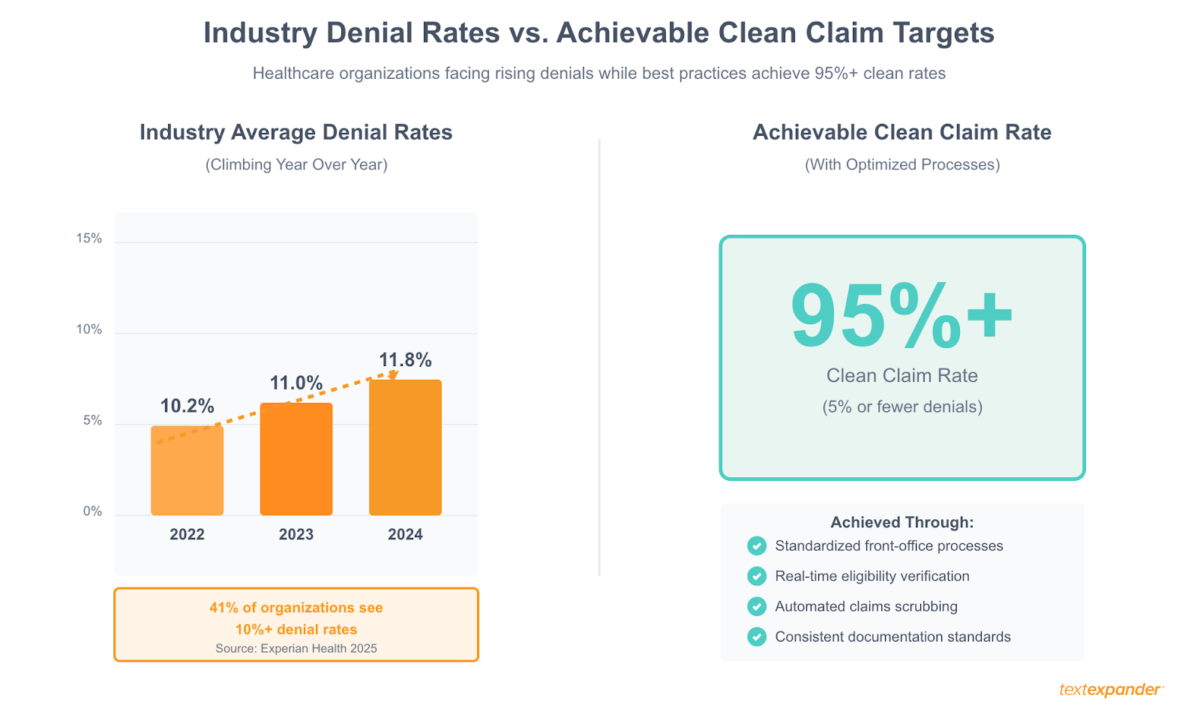
Look, we get it. Your denial rates are climbing. Industry data shows they hit 11.8% in 2024, up from 10.2% just a couple years back. Collections are slowing down. Your billing staff is drowning in rework. And the absolute last thing you want to hear right now is “let’s rip out the whole system and start over.”
Here’s the thing: you probably don’t need to replace anything. Most practices never come close to using their full billing system capabilities. Between features that got skipped during implementation, settings that defaulted to “manual” when automation was sitting right there, and workarounds your team created years ago that nobody’s questioned since—there’s usually tons of room for improvement.
We’re going to walk through exactly how organizations are fixing their billing workflows without the nightmare of system migration. Real improvements. Measurable results. No massive IT projects required.
The two pillars that separate struggling billing operations from successful ones? Consistency and control. When every staff member handles tasks differently: Free-texting insurance explanations, using their own denial appeal language, remembering (or forgetting) payer-specific requirements; you get unpredictable results and preventable errors. Successful operations standardize the critical workflows, giving leadership control over what gets communicated while giving staff the tools to work efficiently. That combination drives down denial rates, speeds collections, and makes quality improvements stick.
Free: Medical Billing Snippets
Download 27 TextExpander Snippets to help make your medical billing team more accurate and more consistent. Save time and reduce denied claims.
Understanding Your Medical Billing Workflow and Process Steps
You can’t fix problems you can’t see. That sounds obvious, but here’s what happens: everyone on your team knows their individual job. Registration knows how to check people in. Coders know how to assign codes. Billers know how to submit claims. But does anyone actually understand how all those pieces connect? Where information gets stuck? Which mistakes in one department create disasters downstream?
Your billing workflow goes something like this: patient schedules, front desk verifies insurance and collects copays, service happens, charges get entered, coders assign diagnosis and procedure codes, claims get submitted to payers, payments come back (or denials), your team posts payments or works denials, and finally you bill patients for whatever’s left. That’s the happy path, anyway.
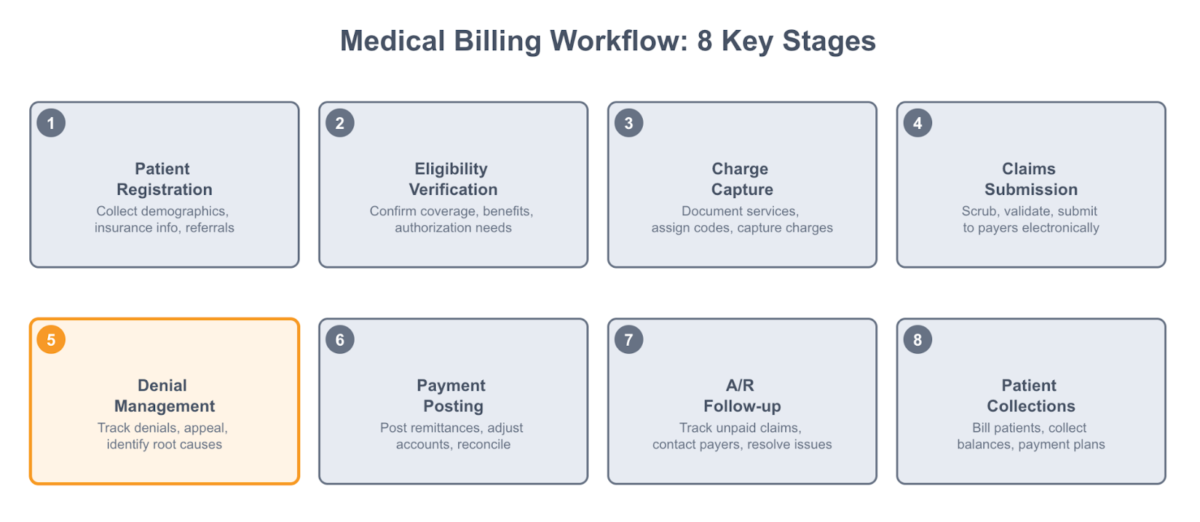
The real workflow looks messier. A patient shows up with insurance that turns out to be inactive—that’s a problem created at registration that won’t surface until the claim gets denied six weeks later. A doctor documents “knee pain” without specifying which knee or why imaging was ordered. Now your coder can’t build a defensible claim. Someone fat-fingers a member ID during data entry, and boom, eligibility denial.
These connections matter because most billing problems don’t start in the billing office. They start at registration, in clinical documentation, during charge capture. If you’re just focused on working denials faster, you’re treating symptoms instead of causes.
The practices that actually improve their numbers don’t just optimize one piece. They map out the whole process, spot where things break down, and fix the workflows that matter most. Maybe your authorization process is a mess and that’s causing half your denials. Maybe your coders are waiting days for documentation and that’s why revenue sits in limbo. Maybe nobody’s systematically reviewing remittance advice, so underpayments just slide right through.
Once you see where your specific problems live, you can target improvements that’ll actually move the needle.
Identifying Common Billing Process Bottlenecks
Let’s talk about where things typically go wrong. Recent research from Experian Health found that 41% of healthcare organizations now see at least 10% of their claims denied. Even more telling—68% report that submitting clean claims is harder now than it was a year ago. This isn’t random. The same problems keep showing up.
Front-office issues create the majority of downstream denials. Incomplete or inaccurate patient information at registration is the big one. Wrong insurance ID numbers, outdated addresses, missing authorization requirements—these all get entered at check-in and don’t cause problems until the claim comes back denied weeks later. By then, the patient’s gone, the clinical details are fuzzy, and your billing team’s stuck trying to piece everything together.
Eligibility verification is another common gap. Lots of practices “verify” insurance by calling the number on the card and asking if coverage is active. But active coverage doesn’t tell you if the patient needs a referral, if your provider’s in-network, what the deductible status is, or whether authorization’s required. Incomplete verification means you discover problems after service, when your options are way more limited.
Claims submission creates bottlenecks too. Manual claim entry into payer portals is slow and error-prone. Claims sit in queues waiting for someone to fix small errors that automated scrubbing would catch instantly. Nobody’s checking for duplicates before transmission, triggering denials that require investigation. When claims finally do go out, weak denial management means rejected ones sit unworked while filing deadlines tick down.
You can spot your bottlenecks by tracking where claims get stuck. High days in accounts receivable? That’s a collection or follow-up problem. Denials for missing information or eligibility? Front-end weakness. Coding errors or formatting problems? Mid-cycle gaps. Pull your denial reports and group them by reason code. The patterns will show you exactly where to focus.
The financial hit from these bottlenecks is real. Healthcare organizations spent an estimated $19.7 billion in 2022 just trying to overturn denied claims. The average denial cost jumped from $43.84 in 2022 to a stunning $57.23 in 2023. Every preventable denial hits your bottom line twice—once in lost revenue, again in the staff time required to fix it.
Revenue Cycle Optimization: Leveraging Existing Technology
Here’s something we see all the time: practices paying thousands of dollars monthly for EHR systems, practice management software, billing platforms—and using maybe 30% of what these tools can actually do. Features nobody enabled during implementation. Settings that defaulted to manual processes. Capabilities staff don’t know exist because nobody trained them properly.
You’re probably sitting on a goldmine of untapped functionality. Your EHR’s billing module can auto-generate charges from encounter documentation. Your practice management system can verify eligibility in real-time. Your clearinghouse can scrub claims for errors before they go out. These aren’t premium add-ons—they’re features you’re already paying for.
Start with an honest audit. When’s the last time you sat down with your EHR vendor and asked, “What can this thing actually do that we’re not using?” Schedule time with your billing system rep. Ask specific questions: Can we automate payment posting? Does our system support electronic remittance advice? Can we set up rules to catch common errors? What reporting do we have for tracking denial patterns?
The answers will surprise you. That manual process your team’s been doing for years? Yeah, the system can handle it automatically with a five-minute configuration change. That report you’re building in Excel every month? The system generates it natively, you just never knew where to find it.
System integration multiplies everything. When your EHR, practice management software, and billing system talk to each other electronically instead of requiring staff to re-enter data everywhere, you eliminate transcription errors and save massive time. Check whether you’re actually using available integration points. Do demographics flow automatically from PM to EHR? Do codes transfer to claim forms without re-entry? Does payment information update accounts automatically?
Maximizing Your Electronic Health Record (EHR) System
Most practices treat their EHR as a charting tool and nothing more. But modern EHRs include serious billing functionality designed to speed up charge capture, improve coding accuracy, and cut down on revenue cycle delays. The trick is actually turning those features on and training people to use them.
Automated charge capture is the big one. Instead of clinicians scribbling procedure codes on paper encounter forms that billing staff key in days later, charges can generate automatically from documented services. When a provider records a procedure in the clinical note, the system creates the billable charge right then. This eliminates the lag time between service and charge entry that keeps revenue sitting in discharged-not-final-billed status.
EHR coding support helps clinicians pick appropriate codes at the point of care. Built-in code lookups show current CPT and ICD-10 codes with descriptions. Some systems suggest codes based on documented clinical information or flag codes needing additional documentation support. When coding happens while the clinical details are fresh, it’s more accurate.
Your EHR likely includes claim scrubbing that validates claims before submission. This catches missing information, incorrect code combinations, and other issues that would cause rejections. Configure scrubbing rules to match your top denial reasons. Getting denied for missing modifiers constantly? Add that to your validation checks.
According to Elation Health, EHR systems with integrated billing optimize workflows and seriously cut down on time spent bouncing between systems. The key is viewing your EHR as a billing tool, not just a medical record keeper.
Optimizing Practice Management Software Features
Your practice management system handles scheduling, registration, insurance verification, claim generation, payment tracking—it’s the operational center of your billing. Yet tons of practices use their PM software like a glorified appointment calendar, leaving automation and workflow features completely untouched.
Real-time eligibility verification is sitting right there in most PM systems. It checks coverage before appointments, alerting staff immediately if insurance is inactive or if the patient’s scheduled with an out-of-network provider. This one feature prevents the most common denial reason. Experian’s 2025 survey shows that missing or inaccurate data leads as the top reason for denials (46% of respondents named it in their top three), followed by authorization issues (36%).
Custom workflows in PM systems automate decision-making that staff currently handle manually. You can set rules like: automatically flag appointments needing prior authorization based on patient insurance and procedure, require copay collection before check-in completes, route new patient registrations to a verification queue, or hold claims from transmitting if documentation is incomplete. These rules ensure critical steps don’t get skipped when everyone’s slammed.
Your PM system generates the actual claim forms for submission. Most practices submit electronically, but many don’t optimize the generation process. Check whether your system uses current payer-specific formatting rules, if required attachments get included automatically, and whether remittance advice posts back to claims automatically for tracking.
The difference between a well-configured PM system and a poorly configured one can literally be hours of daily staff time. When everything requires manual intervention—checking eligibility, generating claims, posting payments—billing staff become data entry clerks. When the system handles routine tasks and only surfaces exceptions needing human judgment, the same staff can process way higher volume with fewer errors.
Integrating Clearinghouses for Claims Validation
Clearinghouses sit between your organization and insurance payers, acting as a quality control checkpoint that catches claim errors before they trigger denials. Think of it as claims pre-flight check. The clearinghouse receives claims from your billing system, validates them against payer requirements, formats them correctly for each payer, and transmits them electronically.
The validation clearinghouses perform goes way beyond what most practice management systems do internally. Your PM software might check for basic completeness—making sure required fields aren’t blank. Clearinghouses apply payer-specific edits reflecting each insurer’s unique submission requirements. They flag claims where the diagnosis doesn’t support the procedure, authorization numbers are missing for services requiring them, or modifiers are needed based on specific code combinations.
Most clearinghouses offer different validation levels. Basic validation catches formatting errors and missing fields—stuff that would cause immediate rejection. Advanced validation applies clinical edits and payer policy rules—catching issues that would cause denials weeks later. Industry research shows that clearinghouses significantly reduce submission errors leading to denials. The small cost for advanced edits pays for itself many times over by preventing denials that cost $50+ to rework.
Beyond validation, clearinghouses provide valuable tracking capabilities. You can monitor claim status in real-time instead of waiting weeks for payer responses, see exactly which claims were accepted versus rejected with specific error codes, and track submission patterns to identify recurring problems.
Clearinghouse integration should be seamless. Claims transmit automatically from your PM software on a schedule—multiple times daily for high-volume practices. Acknowledgments and rejections flow back automatically, updating claim status without staff intervention. Remittance advice arrives electronically and posts payments to patient accounts. If your staff are manually uploading claim files or checking payer websites for status, your integration needs work.
Want to see how automated text expansion can standardize your clearinghouse communications?
Medical Billing Automation Without System Replacement
Automation doesn’t mean replacing everything. It means adding targeted tools and workflows that handle repetitive tasks automatically. The key is identifying which manual processes consume the most time, cause the most errors, or create the biggest revenue delays—then finding automation solutions that address those specific problems without requiring complete technology overhaul.
The best automation targets are tasks your staff perform dozens or hundreds of times daily with little variation: payment posting, eligibility checks, claim status follow-up, patient payment reminders, denial letter responses. When you automate these repetitive activities, staff can focus on exceptions, complex cases, and problem-solving that genuinely requires human judgment.
Lots of automation opportunities exist as features within your current systems that just need enabling. Your clearinghouse might offer automated claim status checking that queries payers on your behalf. Your PM system might support automated appointment reminders that reduce no-shows. Your EHR might include automated charge capture rules. Before looking at external tools, audit what you’re already paying for but not using.
When external tools make sense, focus on ones that integrate with existing systems rather than requiring parallel data entry. Patient payment portals connecting to your PM system, text messaging platforms pulling appointment data automatically, eligibility verification services updating insurance information in real-time—these add automation without creating additional manual work.
Industry case studies document serious time savings from targeted automation. Practices implementing automated claims scrubbing and eligibility checks have recovered 20+ hours weekly by reducing rejections. That’s half a full-time employee’s workload freed up through automation of just two workflow areas.
Automating Payment Posting and Accounts Receivable Follow-up
Payment posting—matching incoming payments to open claims and updating account balances—eats enormous staff time despite being highly routine. When payments arrive electronically via ERA (Electronic Remittance Advice) with standard formatting, there’s zero reason for humans to manually key in every transaction.
Automated payment posting uses rules engines to read ERAs, identify corresponding claims in your system, post payment amounts, adjust off contractual write-offs, and move remaining balances to patient responsibility or secondary insurance. The time savings are massive. A billing specialist manually posting 30 payments per hour handles maybe 240 in an eight-hour day. Automated posting processes thousands of transactions overnight while generating exception reports for the handful needing human review—duplicate payments, unexpected denials, discrepancies between expected and actual amounts.
Automated posting also improves accuracy. Manual entry creates opportunities for transposition errors, posting to wrong accounts, missing secondary insurance that should be billed next. Automated systems apply consistent logic, always check whether secondary coverage exists, and create detailed audit trails showing exactly how each payment was handled.
Accounts receivable follow-up is another high-volume activity ready for automation. Instead of billing staff manually generating aging reports and deciding which accounts to work, automated systems identify claims meeting specific criteria—outstanding past a threshold, with payers known for processing delays, belonging to patient accounts with payment arrangements—and automatically add them to work queues with appropriate prioritization.
Automated patient payment reminders via email, text, or phone further reduce manual outreach. When balances aren’t paid within a defined period after statement generation, the system automatically triggers reminder messages with payment links. Research consistently shows patients are more likely to pay when electronic options are readily available, and automated reminders increase response rates compared to passive statements.
The goal isn’t eliminating human involvement—it’s having automation handle routine cases so staff can focus on complex denials, significant balances, and accounts requiring negotiation or special handling.
Using Text Expansion Tools to Standardize Communication
Healthcare billing involves mountains of repetitive communication: explaining denial reasons to patients, providing authorization status to payers, documenting account notes, responding to common insurance questions, sending standard notifications about payment arrangements. When staff type these messages from scratch hundreds of times, they waste time and create inconsistencies in how your organization communicates.
Here’s the problem with free-text communication: you lose control. One biller explains balance-after-insurance using clear, compliant language. Another uses confusing jargon. A third accidentally omits critical information. When payers receive inconsistent appeal letters, some get approved while identical situations get denied because the wording was weaker. Patients get different explanations for the same billing situation depending on who they talk to.
Text expansion tools solve both problems by giving you consistency and control. Leadership creates standardized content using language vetted for compliance and effectiveness—then locks it down so the approved version gets used every time. A billing specialist types “auth.request” and instantly inserts a complete prior authorization request template with all required fields. A patient service rep types “bal.exp” to generate the organization’s approved explanation of how insurance payments and patient responsibility work. A denial appeal writer uses “den.mednec” to insert paragraph-long medical necessity justification language that’s been pre-approved by compliance.
The benefits extend way beyond speed:
Consistency across your team: Standardized snippets ensure every staff member communicates using identical, vetted language. When your entire billing team uses the same explanation for complex coverage issues, patients get consistent information regardless of who they speak with. When denial appeal letters come from approved templates, you’re presenting the strongest possible case every single time—not hoping whoever wrote today’s appeal used effective language.
Control over compliance: When denial appeal letters come from approved templates vetted by compliance, you eliminate the risk of staff using language that weakens your case or raises compliance concerns. Leadership controls what gets communicated, while staff get the efficiency of instant access.
Payer-specific accuracy: Insurance companies have increasingly specific requirements for authorization requests, claim reconsiderations, and documentation submissions. Rather than expecting every staff member to memorize each payer’s preferred format, organizations create snippet libraries with payer-specific templates. Staff quickly pull up the right template, customize patient-specific details, and send exactly what that payer expects.
Documentation in your billing system also benefits from standardization. Account notes, status updates, and activity logs are critical for tracking claim history and coordinating team efforts, but typing detailed notes for every action is time-consuming. Snippets for common scenarios—”Contacted payer regarding claim delay, provided tax ID and NPI, representative confirmed processing within 5-7 business days”—let staff document thoroughly without sacrificing speed. More importantly, standardized documentation means anyone picking up an account can immediately understand what’s happened and what needs to happen next.
The learning curve is minimal. Most users become proficient within days, and time savings begin immediately. Unlike complex software requiring extensive training and workflow changes, text expansion adds value to existing processes without disrupting how staff work.
Gain consistency and control over your billing communication
Healthcare organizations use TextExpander to standardize patient explanations, denial appeals, and authorization requests across their entire team. Lock down approved language while giving staff instant access to what they need.
Medical Billing Best Practices for Front-Office Operations
Your front office determines whether billing goes smoothly or hits repeated obstacles. When registration staff capture accurate information, verify insurance properly, and collect what’s due upfront, the billing process flows cleanly. When they don’t, your billing team inherits problems costing way more to fix later than prevent initially.
The challenge isn’t just accuracy—it’s consistency. Without standardized workflows and controlled processes, one registration staff member might thoroughly verify eligibility while another skips steps when rushed. One person collects copays reliably while another forgets. This variability creates unpredictable outcomes: some claims sail through while others get denied for preventable reasons that come down to which staff member handled registration.
The financial impact of front-office errors cascades through your entire revenue cycle. A missing authorization number triggers a denial six weeks after service when you’re trying to close that month’s books. An incorrect patient address means statements bounce back undeliverable. An uncollected copay becomes a small-balance account costing more to pursue than it’s worth. These aren’t rare exceptions—they’re daily occurrences in practices without optimized front-end workflows and standardized procedures.
Industry data backs up prioritizing front-office improvements. When Experian surveyed revenue cycle leaders, missing or inaccurate data ranked as the top denial reason (46%), and authorization problems ranked second (36%). Both are preventable with better front-office processes. Clean intake and eligibility verification consistently rank among the top operational fixes recommended by revenue cycle leaders.
Training and accountability matter as much as technology. Front-office staff need to understand how their work connects to billing outcomes. When someone at registration learns that an insurance verification shortcut they’ve been taking causes denials costing $50 each to rework, behavior changes. Regular quality audits showing each staff member’s error rates for specific data elements create both awareness and motivation.
Building error-proof workflows requires more than telling staff to be careful. It means configuring your PM system to require complete information before check-in proceeds, implementing real-time eligibility verification that happens automatically, using electronic insurance card scanning to eliminate transcription errors, and creating standardized checklists ensuring payer-specific requirements don’t get missed. Consistency comes from systems that don’t allow shortcuts, combined with controlled processes that ensure critical steps happen every single time.
For detailed guidance on maintaining accuracy while handling high patient volumes, see our guide on medical billing compliance best practices.
Ensuring Accurate Patient Data Capture
Patient registration is where revenue cycle success begins or fails. Every piece of information collected here—demographics, insurance, contact details, authorization numbers—flows into claims submitted weeks later. Errors introduced at registration don’t surface immediately; they emerge as denials when the claim comes back unpaid, by which time the patient’s gone and clinical details are harder to reconstruct.
The most effective approach combines technology assistance with structured workflows. Electronic insurance card scanning eliminates manual transcription of member IDs, group numbers, and payer names—the most common source of eligibility-related denials. OCR reads the card and populates PM system fields automatically, achieving near-perfect accuracy while saving staff time. For patients without physical cards, real-time eligibility verification queries the payer directly to confirm active coverage and pull current information.
PM system configuration should prevent incomplete registrations. Required field validation stops staff from advancing past the registration screen when critical information is missing. If authorization number, referring provider NPI, or patient phone number is required, the system shouldn’t allow check-in until those fields are populated. This seems obvious, but many practices run with minimal required fields because they’re concerned about slowing down check-in. Reality is that handling incomplete registrations later is way slower and more expensive than capturing complete information initially.
Standardized verification checklists built into your registration workflow help staff remember payer-specific requirements that vary by insurance company. Some payers require authorization for certain procedures while others don’t. Some need referring provider information while others don’t ask. Rather than expecting staff to memorize hundreds of payer-specific rules, embed decision support directly into the registration process.
Contact information accuracy matters more than many realize. When addresses, phone numbers, and emails are wrong, you can’t communicate with patients about balances, statements don’t reach them, and you can’t follow up on payment arrangements. Asking patients to verify pre-populated information is current—rather than spelling everything from scratch—catches changes while respecting their time.
Streamlining Insurance Eligibility Verification
Insurance eligibility verification answers critical questions before service: Is the patient’s insurance active? Are we in-network? Does this service require prior authorization? What’s the patient’s financial responsibility? When you verify this upfront, you prevent most claim denials and avoid awkward conversations about collecting from patients after service when they assumed insurance would cover it.
The traditional approach—staff manually calling payers or logging into multiple portals—is slow, inconsistent, and error-prone. Staff make verification calls when they remember or when time permits, leading to gaps where appointments proceed without coverage confirmation. When they do verify, information gets scribbled on paper or entered into free-text notes nobody checks systematically later.
Automated real-time eligibility verification solves these problems by querying payers electronically as soon as appointments are scheduled. Your PM system sends a standardized request to the payer, receives structured data back about coverage status, and flags issues immediately—before the patient arrives. This happens in seconds, occurs consistently for every appointment, and populates your system with structured data billing staff can reference when creating claims.
Real-time verification reveals issues while you still have time to address them. If insurance is inactive, you can contact the patient to update coverage before their appointment. If the service requires authorization, you can initiate precertification with adequate time rather than discovering the requirement after service when it’s too late. If the patient will have significant out-of-pocket responsibility, you can discuss payment options in advance rather than surprising them with a large bill later.
Implementation requires choosing an eligibility verification service integrating with your PM system and supporting your major payers. Most clearinghouses offer eligibility verification as an add-on with per-transaction pricing. Some PM systems include integrated verification. Configuration involves mapping your PM system’s data fields to the standardized eligibility transaction format and establishing when verification occurs—immediately when appointments schedule, nightly in batch, or some combination.
Studies document that automated eligibility verification can save 20+ hours weekly. For a mid-sized practice, that’s roughly half of one full-time employee’s workload recovered—hours that can shift to denial management or complex account resolution. The cost of verification transactions (typically $0.10-0.30 per query) is minimal compared to the cost of a denied claim ($50+) or an uncollectable patient balance.
Improving Claims Processing and Denial Management
Clean claims paying on first submission are the cornerstone of healthy revenue cycle management. Industry benchmarks set clean claim rates at 95% or higher—fewer than one in twenty claims should require rework. Yet initial claim denial rates climbed to 11.8% in 2024, with 38% of organizations reporting denial rates of 10% or higher. The gap between best-practice performance and typical results represents lost revenue and wasted staff time.
Claims processing improvement has two parts: submitting cleaner claims initially and managing denials more effectively when they occur. Both are achievable with current systems through better workflows, targeted automation, and systematic problem-solving. You don’t need enterprise AI or sophisticated denial prediction analytics—you need discipline around using quality control tools in your existing software and building feedback loops preventing recurring issues.
The financial impact of poor claims processing is substantial. Administrative costs per denied claim increased from $43.84 in 2022 to $57.23 in 2023—and those are just direct costs. Add lost revenue from claims never resubmitted, write-offs from missed timely filing deadlines, and opportunity cost of billing staff time consumed by denial work, and the true cost likely exceeds $100 per denial.
Improving claims processing means implementing systematic quality checks before claims leave your organization, analyzing denial patterns to identify preventable issues, and building efficient workflows for working denials that do occur.
Achieving Higher Clean Claims Rates Through Coding Accuracy
Clean claims pay on first submission without additional information requests, corrections, or appeals. They contain accurate codes supporting medical necessity, complete patient and provider information, proper formatting matching payer specifications, and any required authorization or referral numbers. Submitting clean claims consistently isn’t luck—it’s systematic quality control catching errors before transmission.
Medical coding accuracy forms the foundation. When diagnosis codes precisely match documented clinical conditions and procedure codes correctly reflect services provided, claims sail through payer edits. When codes don’t align logically—billing an orthopedic procedure with a cardiology diagnosis—payers flag it for review or deny it outright. Coding must tell a coherent clinical story justifying the service as medically necessary.
Most coding errors stem from incomplete clinical documentation rather than coder mistakes. When provider notes lack specificity about diagnosis severity, laterality, or clinical justification for procedures, even excellent coders can’t assign optimal codes. Improving coding accuracy often means improving documentation first. Physician education on documentation requirements, clinical documentation improvement programs reviewing records concurrently, and EHR templates prompting for required clinical elements all support better coding.
Automated claim scrubbing catches errors before submission. Scrubbing software applies rules engines checking for: invalid code combinations, missing or incorrect modifiers, diagnosis codes not supporting procedures billed, formatting errors in payer-specific fields, and missing authorization numbers for procedures requiring them. Claims failing scrubbing edits route to a work queue for correction before transmission, preventing rejections and denials.
Real-world results demonstrate what’s achievable. Industry case studies show practices improving clean claims from 82% to 96%, reducing days in A/R by 15 days. That’s transformation from missing benchmarks to exceeding them, with corresponding cash flow improvement from getting paid two weeks faster on average. Practices achieving these results aren’t using dramatically different technology—they’re using basic claim scrubbing functionality systematically and addressing root causes of their most common errors.
Feedback loops prevent recurring problems. When a code combination consistently triggers denials, update scrubbing rules to catch it before submission. When a specific payer requires modifiers staff frequently forget, build reminders into claim generation. When certain clinicians create documentation leading to coding issues, provide targeted education with specific examples.
For detailed guidance on improving coding accuracy, see our comprehensive article on medical coding accuracy best practices.
Developing a Proactive Denial Follow-up Process
Denied claims won’t resolve themselves. Without systematic follow-up, denials sit in accounts receivable while the revenue they represent either expires (when timely filing deadlines pass) or becomes increasingly unlikely to collect. Effective denial management means working denials quickly, tracking them to resolution, and using denial data to prevent similar issues.
First step is categorizing denials so you can prioritize appropriately. High-dollar denials need immediate attention to prevent significant revenue loss. Denials approaching timely filing deadlines are time-sensitive regardless of amount. Denials for missing information can often be resolved quickly with simple claim correction, while medical necessity denials might require detailed appeals with clinical documentation.
A standardized denial workflow ensures nothing falls through gaps. When a denial arrives on electronic remittance advice, the system automatically generates a work item assigned to appropriate staff based on denial reason. Staff have defined procedures for each common denial type: pull the medical record and authorization for medical necessity reviews, contact the payer’s provider relations line for benefit interpretation questions, check for previous authorizations for services requiring precertification, or review registration data for demographic or eligibility issues.
Documentation discipline is critical. Every denial touchpoint—calls to payers, additional information submitted, appeal letters sent—gets recorded with specific details and dates. This creates an audit trail showing exactly what was done to pursue the claim, provides context if work changes hands, and supplies evidence if the denial proceeds to external appeal.
Recent research shows that overturn rates could be higher—providers successfully appealed 54.3% of denials but only after “multiple, costly rounds of appeals.” Many denials are overturnable but require persistence and proper presentation. Having standardized appeal letter templates, medical necessity justification language, and supporting documentation readily accessible speeds the appeal process and improves success rates.
See how affordable better billing accuracy can be
TextExpander costs just a few hundred dollars annually. Compare that to the $57+ you’re spending to rework each denied claim.
Enhancing Patient Financial Communication
Healthcare billing confuses patients. Complex insurance rules, the gap between charges and allowed amounts, coordination of benefits between multiple payers, timing differences between service dates and patient statements—it creates genuine bewilderment. When patients don’t understand their bills, they’re less likely to pay promptly or at all.
The traditional approach—sending paper statements thirty days after service with minimal explanation—no longer meets patient expectations. Patients want to know what they’ll owe before service, receive notifications via their preferred channel (email or text, not just postal mail), access balances and payment options online, and understand exactly what they’re being charged for.
Research consistently shows patients are more willing and able to pay when you discuss financial responsibility upfront. According to Curogram, automated patient communication regarding billing status, payment plans, and reminders accelerates payment cycles and boosts satisfaction. This isn’t about pressuring patients—it’s transparency helping them plan for expected costs.
Improving patient financial communication doesn’t require expensive patient engagement platforms. Simple changes to when, how, and what you communicate can substantially improve collection rates and reduce the support burden on your billing office.
Utilizing Automated Messaging and Patient Portals
Automated patient communication keeps patients informed about financial responsibility without requiring staff to make individual calls. When implemented thoughtfully, automation feels helpful rather than impersonal because it delivers timely, relevant information exactly when patients need it.
Pre-service communication sets financial expectations before patients arrive. Automated appointment reminders can include estimated patient responsibility based on insurance benefits verified during scheduling, instructions for asking questions about expected costs, and links to pay deposits or copays online rather than at check-in. This primes patients to think about financial obligation and prevents surprise of discovering costs only when checking out after service.
Post-service statement notifications via email or text alert patients that new charges have been posted before paper statements arrive. These digital notifications include the balance amount, a link to view detailed statements online, and payment options. Because they arrive quickly after service while the encounter is fresh, they prompt faster payment than statements arriving weeks later.
Patient portals provide self-service access to billing information, payment history, and payment options. When patients can log in at their convenience to check balances, download statements, set up payment plans, or submit payments, they’re less likely to call your billing office with basic questions. Secure portals allowing patients to view, manage, and respond to billing information increase payment timelines.
Balance reminder automation targets accounts with outstanding balances after statements have been sent. Automated sequences might send email reminders at fifteen days past due, text messages at thirty days, and phone calls at sixty days, with escalating urgency while remaining professional. Some systems automatically offer payment plans for larger balances, allowing patients to self-enroll online without staff involvement.
Implementation requires selecting tools integrating with your practice management system so balance information, payment posting, and communication history stay synchronized. Many PM systems include patient portal and messaging functionality you may already own but haven’t enabled.
The tone and content of automated messages matters enormously. Messages should be friendly and helpful rather than demanding, provide clear information about what’s owed and why, include easy payment options with direct links, and offer customer service contact information for questions.
Creating Clear and Actionable Billing Statements
Your billing statement is your patient’s primary tool for understanding what they owe and how to pay. Yet many healthcare statements are cluttered with technical codes, insurance jargon, and unclear charge descriptions that confuse rather than clarify. When patients don’t understand their statement, they’re more likely to ignore it, call with questions, or assume charges are wrong and refuse payment.
Statement clarity starts with charge descriptions patients can understand. Instead of showing procedure code numbers (CPT 99213) without context, include plain-language descriptions: “Office visit, established patient.” For lab work or diagnostic tests, use the test name rather than just the procedure code. Group related charges together under service dates rather than listing them as individual line items creating visual clutter.
The statement should clearly show the sequence of insurance and patient responsibility: total charges, insurance discount/adjustment, insurance payment, patient responsibility. Many patients don’t understand that insurance companies negotiate rates lower than billed charges and want to see that sequence explained.
Payment instructions must be obvious and easy to follow. The statement should prominently display: total amount due, due date, payment options (online, phone, mail), a direct web link or QR code for online payment, your billing office phone number with hours, and mailing address if sending checks. Making payment as frictionless as possible increases likelihood patients will pay promptly.
For accounts with payment plans, the statement should clearly show: payment plan terms agreed upon, current month’s payment amount due, remaining balance, and what happens if a payment is missed. Patients with arrangements want reminders of those terms rather than statements looking like full balance demands.
Tracking Revenue Cycle Management KPIs
What gets measured improves. Without tracking key performance indicators, you’re flying blind—unable to tell whether process changes are working, which problems are getting worse, or where to focus improvement efforts next. Revenue cycle KPIs provide objective evidence of performance, highlight trends before they become crises, and help you make data-driven decisions.
The challenge with healthcare revenue cycle metrics is that dozens exist, and most organizations don’t have time to track them all. The solution is focusing on a core set of KPIs directly indicating whether your billing process is healthy or struggling: days in accounts receivable (how long to collect payment after service), clean claim rate (percentage paying on first submission), denial rate (percentage of submitted claims denied), net collection rate (percentage of collectible revenue actually collected), and cost to collect (how much you spend on billing relative to collections).
Modern practice management systems can generate reports for all these metrics—you’re likely already paying for the capability but simply need to configure reports and review them regularly. Monthly KPI tracking provides sufficient frequency to identify trends. Quarterly deep-dives examining performance by payer, procedure type, or other dimensions help identify specific improvement opportunities.
The goal isn’t perfect metrics—it’s directional improvement over time. If your clean claim rate is 85% today and improves to 90% over three months as you implement claim scrubbing, that’s measurable success worth celebrating.
Tracking Days in Accounts Receivable and Denial Rates
Days in accounts receivable (days in A/R) measures average time between service dates and payment collection. It’s calculated by dividing total A/R balance by average daily charges. A result of 45 days means on average, you’re collecting payment about 45 days after providing service. Industry benchmarks suggest 30-40 days for most specialties, though this varies by payer mix.
Days in A/R directly impacts cash flow. When days in A/R climbs from 40 to 50 days, you’re effectively extending 10 additional days of credit to payers, straining operating capital. A consistent upward trend signals problems: claims being worked slowly, denials not being resolved promptly, or patient collections lagging. Conversely, when days in A/R decreases, you’re accelerating cash flow without any change in payer rates.
Monitoring days in A/R by payer reveals which insurance companies are your best and worst performers. If one commercial payer consistently takes 60+ days while others pay in 30, you have evidence to bring to contract negotiations.
Denial rate measures the percentage of submitted claims that payers reject or deny. Calculate it by dividing denied claim count by total claims submitted, or for financial impact, divide denied claim dollars by total billed charges. Current industry data shows initial denial rates hit 11.8% in 2024, but best-performing organizations maintain rates below 5%.
Denial rate trends tell you whether claim quality is improving or deteriorating. A rising denial rate indicates problems: changes in payer requirements staff haven’t adapted to, training gaps as experienced staff turn over, or new services with billing requirements your team doesn’t understand yet.
Breaking down denials by reason code helps focus improvement efforts. If 40% of denials are for missing authorization, that’s a front-office verification problem. If medical necessity denials dominate, you need better clinical documentation or coding review. Most PM systems can generate denial reason reports—use them to target your highest-volume denial reasons first.
Tracking both days in A/R and denial rate together reveals cause-and-effect relationships. When denial rates increase, days in A/R typically increases shortly after because denied claims need rework and resubmission, delaying collection.
Building Simple Performance Dashboards Using Existing Reports
KPI tracking doesn’t require enterprise business intelligence software. Your practice management system already generates most reports you need—the challenge is organizing them into a simple dashboard making trends visible at a glance. Excel or Google Sheets provide adequate tools for most practices to create effective performance monitoring.
Start by identifying which reports your PM system generates containing KPI data. Most systems include: aging reports (for calculating days in A/R), denial reports (showing denied claim counts and reasons), payment reports (for tracking collections), and claims reports (showing submission volumes and results). Schedule these reports to generate automatically at month-end.
Export key metrics from each report into a simple spreadsheet tracking tool. Create columns for each month and rows for each KPI. Enter calculated values—days in A/R, denial rate percentage, net collection rate—for each month. This creates a historical trend view showing whether metrics are improving or deteriorating. Add simple line charts visualizing trends, making patterns obvious even to staff who aren’t numbers-oriented.
For more granular analysis, maintain separate tracking sheets for different dimensions: KPIs by payer (which insurance companies are your best and worst performers), KPIs by provider (identifying training needs or documentation issues), or KPIs by procedure type (revealing which services have billing challenges). You don’t need to track all these dimensions from day one—start with overall organizational KPIs and add detailed tracking as specific questions arise.
Keep dashboards simple and actionable. A dashboard with fifty metrics is overwhelming and will be ignored. Five to seven carefully chosen KPIs with clear visualizations and brief commentary provide sufficient insight for decision-making. The best dashboard is one that gets used consistently.
Training Staff on Billing Operations Best Practices
Technology and processes don’t bill claims—people do. Even the most sophisticated software and well-designed workflows fail if staff don’t understand their importance, aren’t trained properly, or don’t have accountability for quality. Your billing improvement success ultimately depends on building team capabilities and maintaining consistent standards.
Healthcare billing staff face a legitimately challenging job. Payer rules change frequently, coding guidelines evolve annually, new technology gets deployed regularly, and workflow expectations increase. Without ongoing training and clear performance standards, even experienced staff struggle to maintain quality. And with high turnover, you’re constantly onboarding new people who need to reach competence quickly.
The consistency problem compounds as teams grow. Each staff member develops their own approach, their own shortcuts, their own way of handling common situations. Without controlled processes and standardized methods, you end up with as many different approaches as you have staff members. That variability shows up in your denial rates, your collection times, and your compliance risk.
Effective training isn’t one-time orientation when someone starts—it’s an ongoing program addressing changing requirements, reinforcing standards, and filling knowledge gaps as they’re discovered. The most successful organizations combine: structured onboarding covering fundamentals thoroughly, regular refresher training on high-error topics, just-in-time education when new situations arise, and performance coaching addressing individual gaps. Critically, they pair training with standardized tools and processes that maintain consistency even as staff change.
Training investment pays measurable returns. When front-office staff understand that accurate insurance verification prevents denials, verification quality improves. When billing specialists understand specific payer requirements, clean claim rates increase. The cost of training is trivial compared to revenue impact of preventable billing errors.
Educating Staff on Efficient System Use and Compliance
Your staff probably uses only a fraction of your billing system’s capabilities because nobody taught them the full feature set or they learned workarounds that seemed easier but create problems later. Systematic training on your PM system, EHR billing modules, and related tools uncovers shortcuts and automation features staff aren’t using, clarifies proper procedures for common scenarios, and eliminates inefficient workarounds.
Start with a capabilities audit. Have your system vendor or a power user conduct training sessions demonstrating features related to each workflow area: registration, eligibility verification, charge capture, claim generation, payment posting, denial management, and reporting. Encourage staff to ask “how do I do X?” questions about their daily frustrations—you’ll often discover the system handles these situations but staff didn’t know the feature existed.
Document standard operating procedures capturing the right way to use your systems for common scenarios. These SOPs should include: step-by-step instructions with screenshots, explanations of why each step matters, examples of what happens when steps are skipped, and links to related system documentation. Store SOPs in a shared location where all staff can access them when questions arise.
Compliance training is equally critical as operational training. Billing staff must understand: HIPAA privacy and security requirements applying to patient financial information, proper coding and documentation standards preventing fraud and abuse allegations, regulations around balance billing and surprise billing varying by payer and state, and timely claim submission and appeal deadlines that, if missed, forfeit revenue.
Role-specific training acknowledges that front-office staff need different knowledge than billing specialists or coding staff. Registration staff need deep expertise in insurance verification and patient intake but don’t need to understand claim submission technical requirements. Billers need extensive payer policy knowledge but don’t need to master clinical documentation guidelines. Coders need medical terminology and coding rules but don’t handle patient financial counseling.
Gaining Clinical Buy-in for Improved Documentation Practices
Billing problems often trace back to clinical documentation gaps that coding and billing staff can’t fix after the fact. When providers don’t document medical necessity rationale for services, specificity about diagnoses, or details about procedures performed, even excellent coders struggle to build defensible claims. Improving documentation requires physician and clinician engagement—you can’t force it from the billing office.
The challenge is that clinicians view documentation as administrative burden rather than revenue enabler. They want to see patients, not write notes. When billing staff complain that documentation is insufficient, clinicians often perceive it as criticism rather than constructive feedback. And when different clinicians document the same situations differently, you lose the consistency needed for predictable billing outcomes.
Lead with impact rather than process. Instead of saying “coders need more specific documentation,” explain “incomplete documentation cost us $X this month in denied claims and under-coding.” Specific examples resonate more than abstract requests: “We’ve had five claims denied for medical necessity because the progress note didn’t explain why imaging was ordered. If we can add that one sentence about clinical reasoning, those denials would be preventable.”
Clinical documentation improvement programs provide systematic approaches to enhancing documentation quality while maintaining consistency. CDI specialists review medical records concurrently (while patients are still admitted or shortly after encounters) and query physicians about ambiguous or incomplete documentation. These queries take the form: “Based on clinical indicators documented, would you clarify whether the condition was present on admission?” rather than “Your documentation is insufficient.”
For more on implementing CDI programs effectively, see our detailed guide on clinical documentation improvement software and best practices.
EHR template optimization helps providers document properly without extra burden while ensuring consistency. Work with physicians to build encounter templates that prompt for information billing needs—not as free text fields they might skip, but as structured data elements integrating naturally into clinical workflow. When every provider uses the same template for similar encounters, you get consistent documentation supporting consistent billing outcomes.
Rolling Out New Workflows Without Disrupting Care
Process improvements fail when they’re poorly implemented, no matter how sound the underlying changes. Healthcare billing learned this the hard way during hasty EHR transitions and ICD-10 conversions that created operational chaos. When you’re making workflow changes—even beneficial ones—thoughtful rollout planning prevents disruption.
Change management basics apply: communicate changes early and clearly, provide training before implementation not after, start small with pilot groups when possible, gather feedback and adjust based on real-world experience, and give staff adequate time to adapt before expecting full productivity.
Phased rollout reduces risk by testing changes with a subset of staff before org-wide deployment. If you’re implementing automated eligibility verification, start with one front-desk person handling it for all appointments for two weeks. Identify issues with the smaller test group where mistakes don’t impact full operations. Refine the process based on their feedback, document the refined procedure, then expand to the next group.
Training must precede implementation. Staff shouldn’t be learning new workflows simultaneously with using them in production. Conduct training sessions at least a week before go-live, provide written job aids and reference materials, and offer hands-on practice in a test environment when possible.
Communication about why changes are being made builds buy-in more effectively than just announcing what’s changing. When staff understand that automated payment posting will eliminate hours of manual data entry, they’re more receptive than if someone just tells them “we’re changing how payments get posted.”
Quick reference materials support staff during the transition period when new workflows aren’t yet automatic. Create one-page guides showing key steps, post reminders near workstations, and offer easily accessible digital resources. TextExpander snippets can provide instant access to workflow checklists—staff type an abbreviation and get step-by-step instructions right where they’re working.
Get consistency and control over your billing workflows
Join healthcare organizations achieving faster collections, lower denial rates, and standardized communication with TextExpander. Lock down approved language while giving your team instant access to what they need. Stop letting free-text variations create billing inconsistencies.
Frequently Asked Questions
How do I maintain consistency across my billing team when staff handle things differently?
Standardization is the answer. Replace free-text communication with approved templates and snippets that every staff member uses. Configure your systems to require complete information before advancing workflows—don’t allow shortcuts. Create documented standard operating procedures showing the correct way to handle common scenarios. Use tools like TextExpander to give staff instant access to pre-approved language for patient explanations, denial appeals, and payer communications. When leadership controls what gets communicated and processes ensure critical steps happen consistently, individual variations disappear. The most successful billing operations combine technology that enforces standards with training that explains why those standards matter.
Can I really improve medical billing process efficiency without replacing my current system?
Yes. Most healthcare organizations use only a fraction of their current software’s capabilities. By fully utilizing your EHR’s integrated billing modules, practice management automation features, and clearinghouse validation tools, you can achieve meaningful improvements in clean claim rates, denial reduction, and collections speed. Focus on workflow optimization, staff training, and targeted automation for repetitive tasks rather than expensive system replacements.
What is revenue cycle optimization and how does it apply to my practice?
Revenue cycle optimization means improving how your practice handles billing from patient registration through final payment collection. It applies by identifying bottlenecks delaying revenue, reducing errors causing claim denials, maximizing features in existing systems, and automating repetitive tasks wasting staff time. Even small practices benefit—fixing front-office registration workflows, implementing automated eligibility verification, and improving denial follow-up can reduce days in accounts receivable by 10-15 days while lowering denial rates from 15% to under 5%.
How can an organization improve its revenue cycle management?
Organizations improve revenue cycle management by taking a systematic approach: audit current workflows to identify bottlenecks, implement front-end verification to prevent denials before claims submit, utilize existing system automation features staff aren’t currently using, establish KPI tracking to measure improvement, and provide ongoing staff training on best practices and compliance. The most successful organizations focus on preventive measures like better registration accuracy and automated claim scrubbing rather than just working harder on denial management after problems occur.
What low-cost automation tools can complement my existing billing workflows?
Several affordable automation tools integrate seamlessly with existing billing systems: clearinghouse services with advanced claim scrubbing cost $0.10-0.30 per claim and prevent costly denials, real-time eligibility verification services save 20+ hours weekly by automating insurance checks, text expansion tools like TextExpander standardize billing communications for a few hundred dollars annually, and automated patient payment reminders through your existing PM system or affordable third-party services increase collection rates. Focus on tools integrating with current systems rather than requiring parallel data entry—this maximizes value while minimizing implementation complexity.
How do I identify and prioritize the biggest billing bottlenecks?
Identify billing bottlenecks by analyzing denial reports grouped by reason code (high rates of missing information or eligibility denials indicate front-office issues), reviewing accounts receivable aging by payer (payers taking 60+ days signal claims processing or follow-up problems), tracking where claims spend time (long gaps between service and claim submission suggest charge capture delays), and surveying staff about repetitive manual tasks consuming their time. Prioritize fixes based on financial impact and ease of implementation—authorization-related denials affecting high-value procedures deserve immediate attention, while small-balance collection issues might be addressed later.
What are medical billing best practices for reducing claim denials?
Medical billing best practices for reducing denials include: verifying insurance eligibility in real-time before appointments (preventing the #1 denial reason), obtaining required prior authorizations before service delivery, implementing automated claim scrubbing catching errors before submission, training coders on documentation requirements and payer-specific rules, creating denial feedback loops preventing recurring issues, and working denials quickly while timely filing limits allow resubmission. Organizations achieving clean claim rates above 95% consistently apply these practices rather than relying on denial management after problems occur.
How does coding accuracy affect the billing process?
Coding accuracy directly impacts whether claims pay on first submission or get denied for medical necessity, incorrect code combinations, or unsupported diagnoses. Accurate coding requires clinical documentation providing the specificity coders need, use of current code sets reflecting annual updates, validation of code relationships demonstrating medical necessity, and assignment of appropriate modifiers explaining special circumstances. When coding is accurate, claims sail through payer edits. When it’s not, you face denials requiring expensive rework, potential compliance issues, and under-coding leaving revenue uncollected. Improving coding accuracy typically means improving clinical documentation first through provider education and concurrent documentation review.
Which key metrics best reflect billing process improvements?
Days in accounts receivable shows how quickly you’re collecting payment after service, with 30-40 days being benchmark performance. Clean claim rate measures percentage paying on first submission, with 95%+ being the goal. Denial rate tracks percentage of submitted claims rejected, with best performers maintaining rates below 5%. Net collection rate shows what percentage of collectible revenue you’re actually recovering. Cost to collect measures how much you spend on billing relative to collected revenue. Together, these five KPIs provide a complete picture—track them monthly to identify trends and measure improvement.
How can I improve medical billing workflow efficiency?
Improve billing workflow efficiency by mapping current processes to identify where work stalls or errors occur, eliminating manual handoffs through system integration and automation, implementing electronic claim submission and remittance advice to speed processing cycles, using automated eligibility verification instead of manual insurance checks, enabling automatic payment posting for standard remittance advice, and creating standard templates and text expansion tools for common communications. The goal is staff spending time on exceptions and complex cases rather than routine data entry. Many practices recover 15-20 hours weekly through workflow optimization without adding staff or changing core systems.
How do I ensure compliance while optimizing billing processes?
Ensure compliance while optimizing by maintaining proper documentation standards supporting code assignment, training staff regularly on HIPAA privacy and security requirements, implementing systematic claim review before submission to catch compliance risks, tracking and auditing denied claims to identify patterns indicating compliance issues, consulting with qualified compliance professionals when making significant process changes, and building audit trails documenting decision-making and corrective actions. Process improvement should never compromise compliance—if automation or workflow changes raise compliance questions, address those before full implementation through compliance committee review or external consultation.
