Business event invitation email templates
A good invitation makes your event sound worth the time and makes saying yes easy.
These business event invitation email templates cover client dinners and lunches, customer and VIP events, conferences, networking events, webinars, team parties, and the follow-up afterward.
Save your event invitations in TextExpander, insert one wherever you type (email, LinkedIn, or your CRM) with a short abbreviation, and fill in the event name, date, venue, and RSVP link.
Table of Contents
- What is a business event invitation email?
- Why send a business event invitation email?
- Client and customer event invitations
- Conference, networking, and webinar invitations
- Team dinner and company party invitations
- Follow-up email after an event
- Tips for writing an event invitation email
- Send event invitations faster
Categories
CommunicationHi, we're TextExpander 👋
Let us be your shortcut to more efficient typing.
Use TextExpander everywhere you work, customized to speed up email response.
Free forever. No credit card required.
What is text expansion?
Text expansion saves time by turning shortcuts into pre-written content. It keeps your responses accurate, up-to-date, and personalized, boosting your team’s productivity.
Table of Contents
- What is a business event invitation email?
- Why send a business event invitation email?
- Client and customer event invitations
- Conference, networking, and webinar invitations
- Team dinner and company party invitations
- Follow-up email after an event
- Tips for writing an event invitation email
- Send event invitations faster
What is a business event invitation email?
A business event invitation email asks clients, prospects, partners, or employees to attend a professional event, such as a business dinner, conference, networking event, product launch, or webinar. It tells guests what the event is, why they should come, when and where it takes place, and how to RSVP, so they can say yes in one step.
A business event invitation email asks clients, prospects, partners, or employees to attend a professional event, such as a business dinner, conference, networking event, product launch, or webinar. It tells guests what the event is, why they should come, when and where it takes place, and how to RSVP, so they can say yes in one step.
This page covers email invitation templates for client and customer events, professional events like conferences and webinars, internal team events, and the follow-up email after the event. Each invitation template is ready to personalize, whether you send it as a plain email or as part of your event marketing.
These templates draw on TextExpander’s work with teams that send the same messages every week. In the 12 months to October 2026, TextExpander users expanded more than 1 billion Snippets and the average user saved nearly 48 hours, so every template here is written to be saved once, personalized, and sent again.
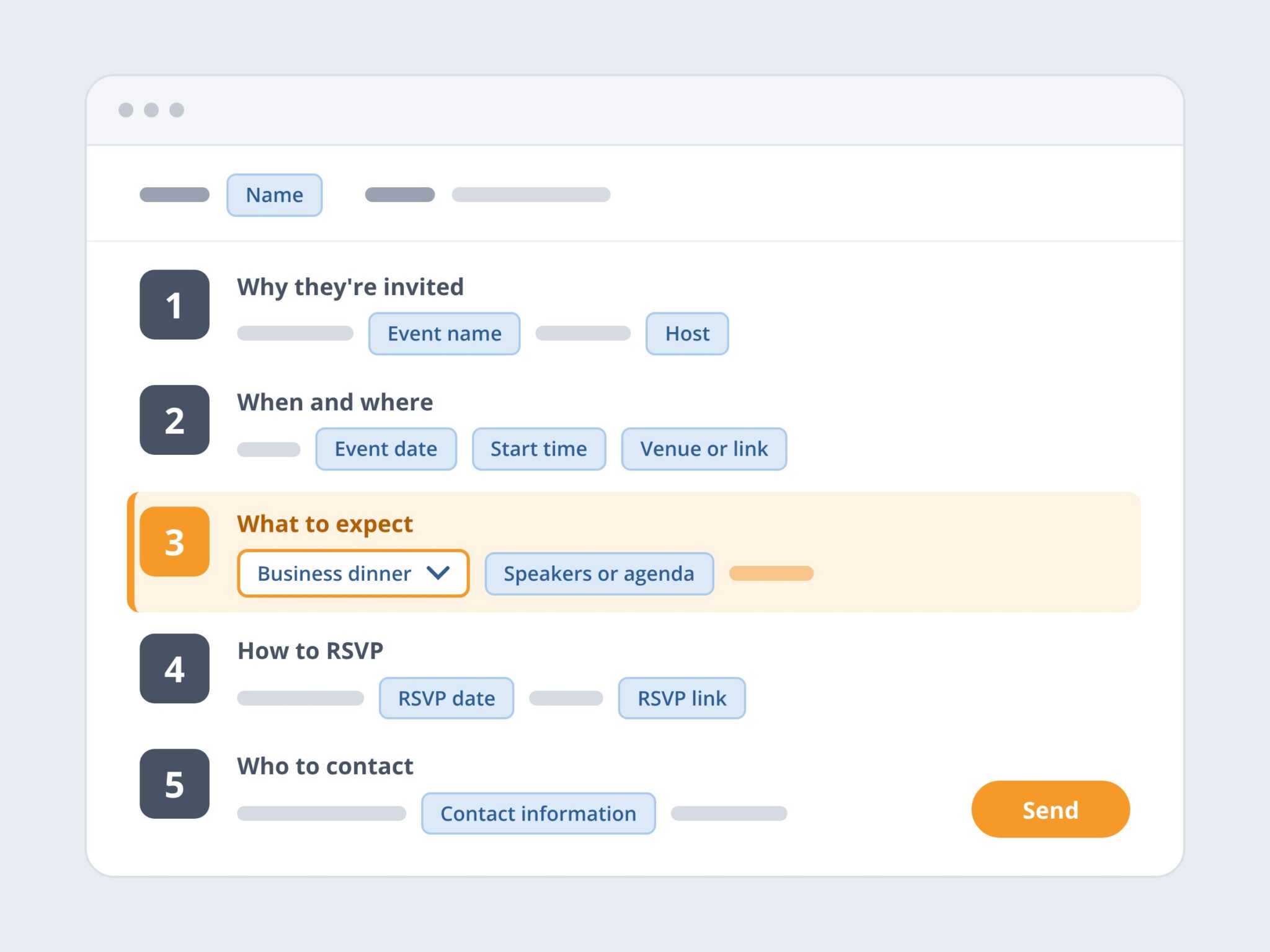
What to include in an event invitation
- Why they’re invited. Name the event and the host in the subject line and the opening, and say in one line why this guest should come.
- When and where. Give the essential event details: the date, time, and location, or the join link for an online event.
- What to expect. Share the format, the agenda, or the guest speakers, so people know what they’ll get from the event.
- How to RSVP. Give one clear call to action, such as a registration link or a reply, and the date you need an answer by, to encourage recipients to respond promptly.
- Who to contact. Add a name and contact information for questions, dietary needs, or accessibility requests.
Why send a business event invitation email?
An email invitation reaches guests where they already plan their week, gives them every detail in writing, and lets them confirm attendance with one click. For the event organizer, it also builds the guest list: every reply tells you how many seats, meals, or name badges to plan for. And it’s the first step in your event marketing, the message that turns potential attendees into registrations, with a link to the event page for larger events.
The event invitation templates below start with client and customer invitations, including the business dinner, then cover conferences, networking events, and webinars, an internal team event, and a follow-up for after the event. Pick the one that fits your event, then personalize it for each guest.
Each template is a TextExpander Snippet. TextExpander saves the text you send often as Snippets and inserts it wherever you type, such as your email, LinkedIn, or CRM, when you type a short abbreviation. Fill-in fields, like the guest’s name or the event date, prompt you as the Snippet expands. Use Copy content to paste a template anywhere, or Add to TextExpander to save it as your own Snippet.
Business dinner invitation email
Client and customer invitations are about the relationship as much as the event, so a personal touch matters. Lead with why you thought of this guest, keep the email short, and make the next step obvious, whether that’s a reply, a registration link, or a calendar invite. Start with the business dinner, the most requested format, then pick the event that fits.
Best for a business dinner invitation to a client, partner, or prospect, when the goal is relaxed conversation and a stronger relationship. It works for a corporate dinner or an annual dinner, too.
Show template as text
Business lunch invitation email
Best for a lower-key lunch, coffee, or breakfast with a client or prospect. Pick the meal, suggest a place, and add a colleague only when one is coming.
Show template as text
Corporate event invitation email for customers
Best for a corporate event for existing customers, with the date, time, and venue listed so guests can scan the details.
Show template as text
Customer appreciation event invitation email
Best for a customer appreciation event that thanks loyal customers and tells them what to expect on the night.
Show template as text
Exclusive sales event invitation email
Best for inviting your best customers to a VIP sale or early access event before it opens to everyone else.
Show template as text
Product launch invitation email
Best for a product launch event, in person or online, when you want customers and partners to see something new first.
Show template as text
Business event invitation email for cold prospects
Best for an event invitation email to prospects who don’t know you yet, with a few highlights that show why the event is worth their time.
Show template as text
Conference invitation email
Conferences, networking events, and webinars compete with dozens of other event invitations. Professionals interested in the topic decide in a few seconds, so put the event details that matter, like the speakers, the topic, or the people they’ll meet, in the first lines, along with the date and the registration link. If seats are limited or the price goes up after a deadline, say so.
Best for a conference or summit, when the draw is the sessions, the speakers, and the people guests will meet.
Show template as text
Networking event invitation email
Best for networking events and mixers, where the main reason to attend is meeting peers in the same industry.
Show template as text
Webinar invitation email
Best for an upcoming webinar, with the title, speaker, date, and registration link in a few short lines.
Show template as text
Awards ceremony invitation email
Best for an awards ceremony, gala, or fundraiser, where the tone should feel like a celebration. For a fundraiser, add how the event will raise funds and for which cause.
Show template as text
Early-bird event registration email
Best for paid events with early-bird pricing, when you want people to register before the deadline and the price goes up.
Show template as text
Team dinner or company party invitation email
Internal events need less persuasion and more logistics. Employees want to know when and where, whether it’s on the company, and whether partners are welcome, so they can plan around it. A short, friendly invitation that answers those questions gets more replies than a formal announcement.
Best for a team dinner invitation or company party invitation, such as a holiday party, happy hour, or team lunch. Pick the event, say who’s paying, and say whether guests are welcome. Use the optional occasion line for a retirement party, a work anniversary, or a big win.
Show template as text
Follow-up email after an event
Best for the day after any event, to thank guests, ask for feedback, and keep the conversation going.
Show template as text
Tips for writing an event invitation email
The best event invitation emails are short, specific, and easy to say yes to. These tips encourage people to open, read, and reply, whether you’re sending a professional invitation email for a client dinner or a quick note about a webinar.
Before you send
- Send it at the right time. Invite guests two to four weeks ahead for most business events, and six to eight weeks ahead for conferences or anything that involves travel. Send a reminder a few days before.
- Write a subject line that names the event. Put the event and the date in the subject line, for example “Dinner on March 18? An invitation from Northwind,” so it stands out from other email invitations. A dinner invitation email or webinar invite with a vague subject line is easy to miss.
- Put the important details up top. Guests should see the essential details, the date, time, and location, in the first two lines, not at the bottom of the email.
- Give one call to action. Ask guests to register, reply, or confirm attendance, and give a date. Two different links or a vague “let us know” lowers responses, while a clear call to action, like one Register button or a direct question, will encourage people to act.
- Make it personal. Use the guest’s name and a line about why you thought of them. That personal touch gets more replies than a mass email.
- Match the format to the event. A plain-text email suits a client dinner. For a conference or product launch, digital invitations from your email marketing tool can add your company logo and a registration button, but keep the essentials in the text too.
Common mistakes to avoid
- Hiding the RSVP date. Without a deadline, replies trickle in and the guest list stays a guess.
- Forgetting the practical details. Parking, dress code, the time zone for online events, and whether guests can bring someone all save follow-up emails.
- Overselling the event. Words like “revolutionary” and “exclusive” in every line make an invitation read like an ad.
- Skipping the follow-up. A thank-you email after the event keeps the relationship going and tells you what to improve for your next event.
Subject line examples for event invitations
A good subject line names the event and gives a reason to open. Add your company name when the guest might not recognize the sender. Adapt these subject line ideas for your next event:
Business dinner: “Join us for dinner on March 18, [Name]”
Client lunch: “Lunch next week? My treat”
Customer appreciation event: “[Company name] invites you to a thank-you evening”
Conference: “Your invitation to [Conference name] from [Company name], June 10 to 12”
Webinar: “Live on May 6: [Webinar title] with [Speaker]”
Team event: “Team dinner on Friday, RSVP by Wednesday”
After you send invitations, an event reminder email a few days before keeps attendance up, and customer appreciation emails keep the relationship going between events.
Send event invitations faster with TextExpander
Most event invitation emails are the same message with different details: a new guest, venue, or date. Writing each one from scratch, or copying last quarter’s invitation, is how wrong dates and other guests’ names end up in someone’s inbox, and why invitations from the same team never sound alike.
TextExpander keeps your approved invitation templates in a shared Snippet group. Type an abbreviation in your email, LinkedIn, or CRM, fill in the guest’s name, the date, and the venue, and send a personal invitation in seconds. When the venue or RSVP link changes, update the Snippet once, and everyone sending invitations has the new version.
- Fill-in fields: prompt for the guest’s name, event date, start time, and venue, so nothing goes out as a placeholder.
- Pop-up menus: choose lunch, coffee, or breakfast, or a team dinner or holiday party, in the same Snippet.
- Optional sections: add a colleague, an occasion, or extra details only when they apply.
- Shared Snippet groups: give sales, marketing, and events teams the same reviewed wording, and update it in one place.
TextExpander allows my team to use standard templates, but still customize specific details without breaking our workflow.
William Brown, Lead Recruiter, Gusto
Running a sales team? See how sales teams use TextExpander. TextExpander also has a free plan with no time limit or credit card.

How a business lunch invitation Snippet works
Business Dinner Invitation Email Example
Type the abbreviation, fill in the guest and the details, and send.

The ;clientlunch Snippet fills in the guest, meal, date, time, and place, so each invitation stays personal and takes seconds to send.

What is TextExpander
With TextExpander, you can store and quickly expand full email templates, Slack messages, and more anywhere you type. That means no more misspellings, no need to memorize complex instructions, or type the same things over and over again. See for yourself here:
Not able to play the video? Click here to watch the video
Work smarter.
With TextExpander, you can store and quickly expand snippets anywhere you type. That means you\'ll never have to misspell, memorize, or type the same things over and over, ever again.
Sign up for freeOur customers love us. We think you will, too.