

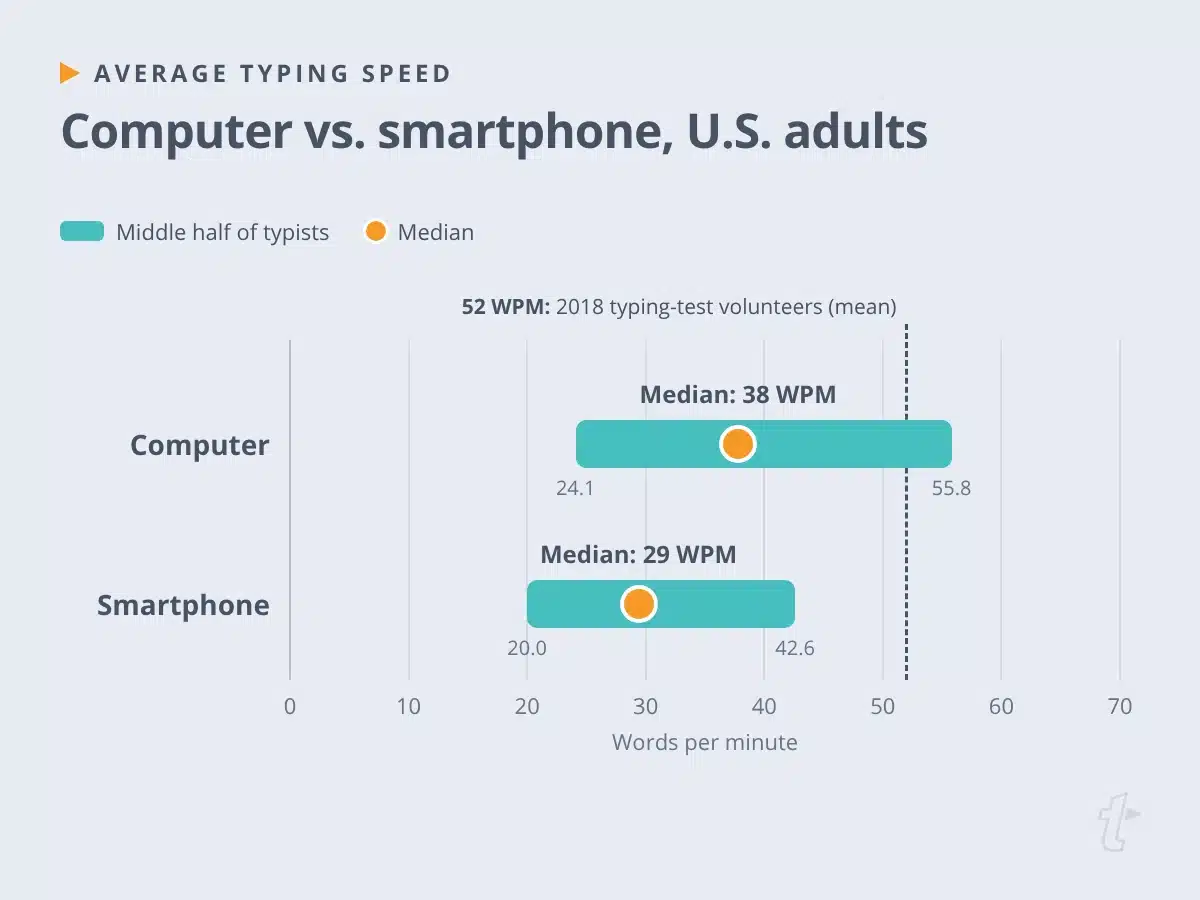
The average typing speed for U.S. adults on a computer is about 38 words per minute (WPM). That’s the median from a January 2026 study of more than 10,000 people, and on a smartphone, the number drops to about 29.
If that sounds low, you’ve probably seen the other figures. Forty WPM gets quoted everywhere, usually without a source, and a large 2018 study put the average closer to 52. All three numbers are real. They measure different people in different ways (which matters a lot when you’re trying to judge your own score).
Below, you’ll find the averages by device and age group, what counts as a good typing speed for work, and how WPM and accuracy are calculated. You’ll also see what to do when typing speed isn’t the thing slowing you down.
Key takeaways
- The average typing speed for U.S. adults is about 38 WPM on a computer and 29 WPM on a phone, according to a 2026 study of 10,613 people.
- Averages vary because studies test different people with different tasks. The often-cited 52 WPM came from typing-test volunteers.
- For most office work, 50 to 60 WPM with high accuracy is a good goal. Some roles set their own minimum, like 40 WPM for federal clerk-typist jobs.
- Accuracy changes your real speed. Uncorrected errors lower your net speed, and corrections cost time even when the score doesn’t show it.
- If much of what you type repeats, reusing that text can save more time than typing faster.
What is the average typing speed?
The average typing speed for U.S. adults is about 38 WPM on a computer. In the 2026 study, published in Scientific Reports by Raymond Hernandez and colleagues, half of the 5,835 computer users typed faster than 37.8 accuracy-adjusted WPM and half typed slower. The middle half of typists fell between 24.1 and 55.8 WPM.
The participants came from the Understanding America Study, a national research panel, so they reflect a broad mix of adults instead of people who seek out typing tests. Each person copied a single sentence, and their speed was adjusted for accuracy.
| Group | Average typing speed | Source |
| U.S. adults on a computer (2026) | 37.8 WPM median (middle half: 24.1 to 55.8) | Hernandez et al., Scientific Reports |
| U.S. adults on a smartphone (2026) | 29.4 WPM median (middle half: 20.0 to 42.6) | Hernandez et al., Scientific Reports |
| Typing-test volunteers (2018) | 51.56 WPM mean | Dhakal et al., CHI 2018 |
| Ratatype users (April 2026) | 30 to 40 WPM median band | Ratatype, 506,024 tests |
So the average person types somewhere between 30 and 40 WPM on a computer, with many adults well above or below that range.
Average typing speed by device and age group
Device and age both make a difference. In the 2026 study, people typing on a computer were faster than people typing on a mobile phone, and the gap held even after the researchers adjusted for differences in who chose each device.
Typing speed also declined steadily with age on both devices, so young adults tend to type faster than older adults. The study reports this as a correlation instead of an average for each age group. Be wary of charts that list a precise WPM for every decade of life, since many come from typing-test platforms that don’t explain how they got the numbers.
Faster typing was also linked to more years of education, higher income, and having a job, which suggests it is a skill that people build through daily practice at school and work.
Typing speed goals for children and teens
For students, Typing.com publishes grade-level goals instead of averages:
- Elementary school (grades 3 to 5): 8 to 20 WPM, with 85% accuracy or higher
- Middle school (grades 6 to 8): 20 to 30 WPM, with 90% accuracy or higher
- High school (grades 9 to 12): 30 to 40 WPM, with 95% accuracy or higher
- College and adult: 40 WPM or more, with 98% accuracy or higher
These are teaching targets. They’re most useful for tracking a child’s progress over a school year.
Why the average person’s typing speed depends on the study
Ask how fast the average person types and you’ll get a different answer from every source. Nobody got it wrong. The studies tested different people, gave them different tasks, and calculated scores in different ways.
Who took the test? The 2018 study from Aalto University and the University of Cambridge analyzed 168,960 volunteers on a typing website. People who go looking for a typing test tend to care about typing, and many of them practice. The 2026 study recruited from a national panel instead.
What did they type? The 2018 participants copied 15 sentences. The 2026 participants copied one. Ratatype, whose April 2026 data from 506,024 tests puts the median between 30 and 40 WPM, doesn’t publish its test length.
How was the score calculated? The 2018 figure is the mean, the average of everyone’s scores. The 2026 figure is a median, the middle score, and it’s adjusted for accuracy. A few very fast typists can pull a mean up, while a median stays put.
Put those together, and the gap between 38 and 52 says more about the typists than about typing. The 2018 group was younger, self-selected, and a lot more practiced.
How typing speed is measured: gross WPM, net speed, and accuracy
Most typing tests count a word as five keystrokes, including letters, numbers, punctuation, and spaces. That standardization lets a test compare a sentence full of short words with one full of long ones. What happens to your mistakes depends on the test.
Gross WPM
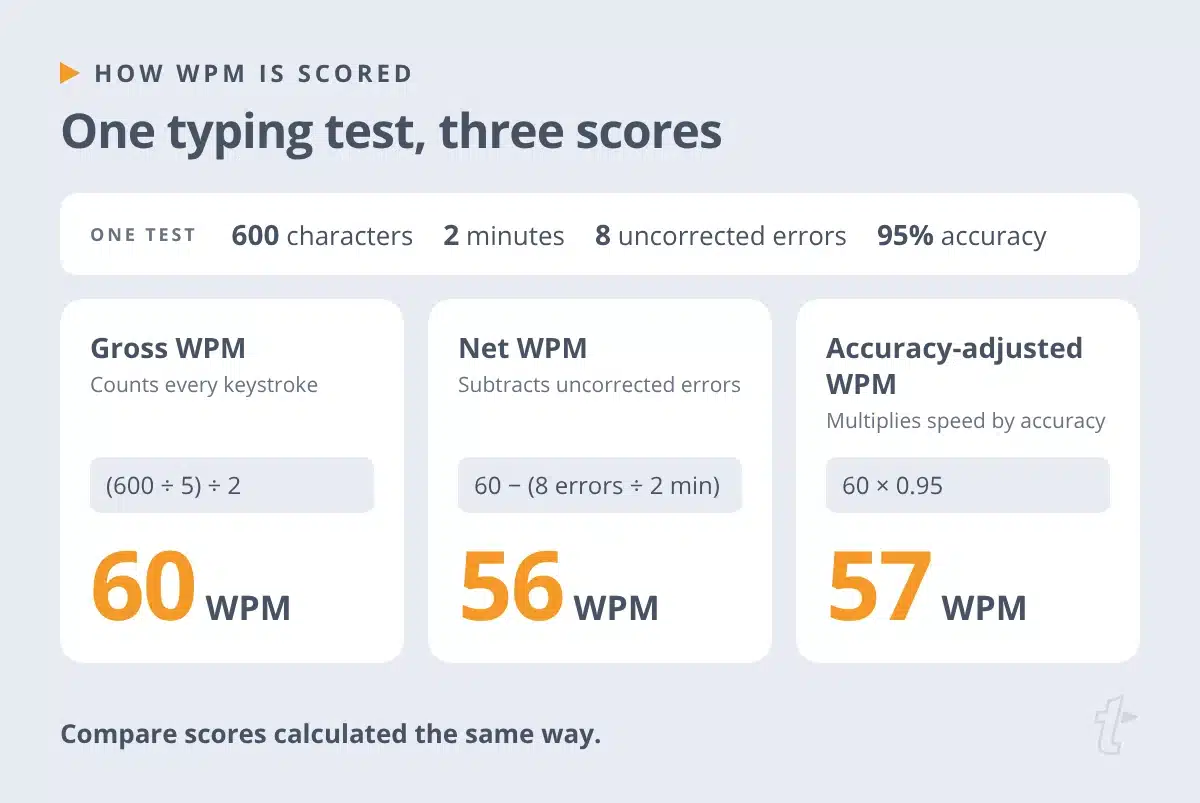
Gross WPM, sometimes called raw WPM, counts every keystroke, right or wrong. Typing.com calculates it this way:
WPM = (characters typed ÷ 5) ÷ minutes
Type 300 characters in one minute, and your gross speed is 60 WPM, even if some of those characters were mistakes.
Net speed and uncorrected errors
Net speed subtracts the mistakes you didn’t fix. On SpeedTypingOnline, net WPM is your gross speed minus your uncorrected errors per minute. Type 80 WPM with 8 uncorrected errors over two minutes, and your net speed is 76 WPM.
Errors you correct aren’t subtracted, because you’ve already paid for them in backspaces and lost rhythm. That’s also why net speed is a better measure of the text you produce than gross speed.
Accuracy-adjusted WPM
Some tests multiply speed by accuracy instead. The 2026 study used this method, and so does the hiring-assessment platform eSkill. At 60 gross WPM and 95% accuracy, your accuracy-adjusted speed is 57 WPM.
These methods won’t give you the same number for the same test, so compare gross scores with gross scores and net scores with net scores.
Why numbers and special characters lower your typing speed
Numbers, symbols, and special characters sit farther from the home row, and many of them need the Shift key, so each one takes more reach than a letter. A test full of product codes or email addresses can score lower than one made of common words. If your job involves a lot of that kind of text, test yourself on similar material.
What’s a good typing speed for work?
For most office work, 50 to 60 WPM with high accuracy is a good typing speed. It’s comfortably above the 2026 median, and it keeps everyday email and documents from feeling like a chore. For typing-intensive roles, like transcriptionists and data entry clerks, 70 WPM or more is a useful goal.
Few employers publish a single standard, so check the job posting for the number that applies to you. One that is published comes from the U.S. Office of Personnel Management. Federal clerk-typist and office automation positions require 40 WPM on a five-minute test with three or fewer errors.
Why higher accuracy matters more than a higher score
Accuracy changes how fast you work more than a test score does. At 40 WPM, you’re typing about 200 keystrokes a minute. At 95% accuracy, that’s around 10 mistakes a minute to find and fix. At 98%, it’s about four.
That federal standard is stricter than it looks. Three errors in five minutes at 40 WPM works out to more than 99% accuracy.
It pays to slow down until your accuracy is steady. Corrections break your concentration and your rhythm, and the time they take never shows up in a gross WPM score.
Typing speed world record and the fastest typists
The fastest typists play in a different league. Among competitive typists, Barbara Blackburn is often cited as the fastest English-language typist. She reached a peak of 212 WPM and could sustain 150 WPM for 50 minutes on a Dvorak keyboard, according to Typing.com. In the 2018 study, the fastest participants topped 120 WPM, and the fastest 10% averaged about 90.
For everyone else, those numbers are more of a curiosity than a benchmark. Going from 38 to 50 WPM changes your workday. Going from 100 to 120 mostly changes your spot on a leaderboard.
How to type faster without losing speed and accuracy
If your score is below where you want it to be, a few habits do most of the work. (Our guide on how to type faster covers each one in detail.)
- Learn touch typing so you can type without looking at the keyboard.
- Practice for 10 to 15 minutes a day. Consistent practice builds muscle memory faster than an occasional long session.
- Slow down until you can hold 98% accuracy, then build speed.
- Drill the keys and words that trip you up most.
- Set up your desk so your wrists stay straight and your shoulders stay relaxed.
Keyboard shortcuts help, too, because editing often takes longer than typing. You’ll find more ideas in our list of typing hacks and our tips to speed up your typing.
When typing speed isn’t the bottleneck
Typing speed works like a speedometer. It tells you how fast you’re moving, not how long the trip will take. If a big share of your typing is the same replies, notes, and details you’ve typed a hundred times, a faster speedometer only gets you through the same trip a little sooner. (Writing also involves thinking, and no typing test measures that part.)
Text expansion takes a different route. With TextExpander, you save text you use often as a Snippet and insert it by typing a short abbreviation in the apps where you already type. A 60-word reply that takes about a minute and a half at the 38 WPM median appears in a couple of seconds.
Mishelle Fisher, Senior Customer Success Operations at RocketReach.co, uses it for more than full messages. She can “save phrases, sentences, paragraphs, emoji strings, special characters… any amount of text and instantly summon it.”
TextExpander also estimates the typing time you save. By default, it assumes you type 50 WPM, a bit above the 2026 median. If you type closer to 38, you can set your own speed in your statistics, and the time-saved figure will rise to match it. (Same Snippets, more minutes back.)
It works the same way for teams. When everyone shares the same Snippets, the reply a colleague perfected last month is one abbreviation away for you, too.
The average typing speed is about 38 WPM. Snippets are much faster.
The 2026 median for U.S. adults on a computer is about 38 WPM. Save the replies, notes, and details you type most as Snippets, and a short abbreviation inserts them in seconds, at an effective speed of 200+ WPM. You still type, but you type a lot less.
Get TextExpander for Free. No credit card required.
Where to start
Take a one-minute typing test and write down your WPM and accuracy. Check whether the test reports gross or net speed, so you know which numbers to compare it with.
If you’re below 40 WPM, touch typing and daily practice will make the biggest difference. If you’re already above 50, look at what you type most often. Some of it is probably text you’ve already written, and that’s text you can reuse instead of typing again.
Frequently asked questions
Is 40 WPM a good typing speed for an adult?
Yes. Forty WPM puts you at or slightly above the typical U.S. adult rate, so the old "average adult types about 40 WPM" rule of thumb holds up. It's plenty for everyday email and documents. If typing is a big part of your job, 50 to 60 WPM with high accuracy gives you more headroom.
What's the average typing speed by age?
Younger adults type faster, and speed drops steadily with age on both computers and phones, according to the 2026 study of 10,613 U.S. adults. The study doesn't publish an average for each age group, though. The age charts you'll find online, which often put teens at about 38 WPM, adults ages 19 to 30 at about 44, adults 31 to 50 at about 42, and adults over 50 at about 34, come from typing-test sites that don't explain how they arrived at those numbers. They point in the same direction as the research, so treat them as rough estimates, not benchmarks.
How fast do you need to type for an office job?
Most employers set their own bar, so the job posting is the best guide. EmployTest, which publishes pre-employment typing tests, puts administrative work at roughly 40 to 60 WPM with 90% accuracy or better, and says data entry roles often call for 60 WPM or more. If the posting mentions a typing test but not a number, ask how long the test is and whether it scores gross or net speed.
Why is my net WPM lower than my gross WPM?
Gross WPM counts every keystroke, including the mistakes. Net WPM takes off the errors you left uncorrected, so each one costs you. Small accuracy gaps add up fast. At 50 WPM, you're pressing about 250 keys a minute, so 93% accuracy means roughly 17 or 18 errors a minute, while 97% means about 7 or 8. Same gross speed, very different amount of finished text.
How fast do court reporters and transcriptionists type?
Court reporters use a stenotype machine, which lets them press several keys at once to write whole syllables and words. To earn the Registered Professional Reporter certification, they must capture 180 WPM of literary dictation, 200 WPM of jury charge, and 225 WPM of testimony with 95% accuracy. The advanced Registered Merit Reporter certification raises those to 200, 240, and 260 WPM. Transcriptionists type on standard keyboards, so even fast ones work at keyboard speeds, well below a stenographer's.
How should I practice for a typing test at work?
Practice on material that looks like the job. Real emails, addresses, and order numbers make you work through punctuation, capital letters, and the jumps between letters and numbers that a test made of common words skips. Take practice tests at the length the employer uses, since a one-minute sprint and a five-minute test reward different things. Then check your setup. OSHA recommends keeping your wrists straight and roughly parallel to the floor, your elbows close to your body at 90 to 120 degrees, and your feet fully supported.