Your TextExpander Snippet library grows. You add templates, responses, and variations for every scenario. Then you’re in the middle of writing an email and you think: didn’t I save something for this? You search. You scroll. You wonder if you’ve duplicated content. You type it again from scratch.
The problem isn’t your Snippets. The problem is finding them fast enough to stay in flow.
Today we’re introducing AI Recommendations, a new feature in the TextExpander Chrome extension that surfaces the right Snippet from your library without you having to search, remember an abbreviation, or leave your workflow.
Not able to play the video? Click here to watch the video
What is an AI text expander, and why it’s different
When you search online for “text expander,” you’ll often find tools that make text longer. They expand sentences, add flowery language, bulk up word count. That’s not what TextExpander does, and it’s not what AI Recommendations does either.
An AI text expander in the true sense retrieves and deploys your pre-written, approved content at the moment you need it most. It looks at the context of what you’re working on, understands what matters right now, and surfaces the Snippet that fits. You approve it. You use it. You move on.
The difference matters. A sentence expander generates new text from scratch. TextExpander with AI Recommendations finds existing content you’ve already written and vetted, bringing it to the surface when you’d benefit from it most.
This is the distinction between creation and deployment, between generating text and retrieving it. AI creates. TextExpander deploys.
How AI Recommendations works in your Chrome browser
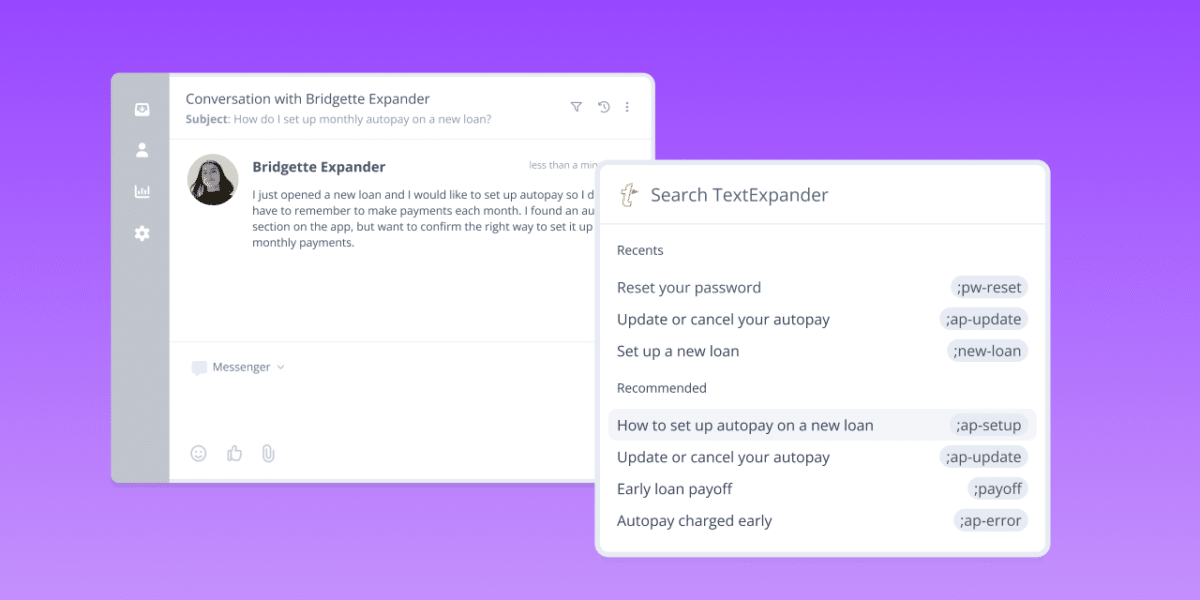
Open TextExpander while working in any web app or document. Click the icon or press Control + Period. The extension analyzes the context around your cursor and identifies what you’re working on.
Within seconds, TextExpander surfaces your most relevant Snippets from your library. You hover to preview the content. You click to expand it right wher you’re working. No abbreviation needed. No manual search. No context switching.
Everything runs on your computer. The extension uses a local language model to understand context and surface your Snippets. Your content never leaves your device. No keystroke logging. No data sent to servers. Just you, your library, and the Snippet you need right now.
Who gets the most value from AI Recommendations
If your Snippet library is small (ten or twenty templates), you probably remember what you have. But most users accumulate larger libraries over time. A support team might have Snippets for fifty different scenarios. A sales rep might have variations for each industry vertical. A marketing team might have dozens of email templates, case study intros, and pain-point descriptions.
In a library of 100 Snippets, finding the one Snippet you need takes work. AI Recommendations changes that. Instead of scrolling, searching, or guessing the right abbreviation, TextExpander surfaces it for you.
New team members benefit especially. When someone joins a team that uses TextExpander, they don’t yet know which Snippets exist or what they’re called. With AI Recommendations, they open the extension and discover the library as they work. They learn by doing. They onboard faster and are staying consistent without memorizing abbreviations from day one.
Teams with brand guidelines and consistent language also see immediate value. Snippets embed your voice and phrasing. AI Recommendations makes sure everyone uses the approved language. Not because they remember to, but because they have the right Snippet exactly when they need it.
Your data stays yours, always
We know data privacy matters. Many teams use TextExpander because they can control where their content lives. That doesn’t change with AI Recommendations.
The feature runs entirely on your device using a local language model. This approach means the system understands context without sending any information to servers or anywhere else. Your Snippets stay on your computer. The context you’re working in never leaves your screen. No data collection. No profiling. No surprises.
For organizations using TextExpander, admins can toggle AI Recommendations on or off from the account settings. If you prefer to keep the feature disabled, you can.
Likewise if you are an individual who would rather not use AI Recommendations, you can disable them in the TextExpander Chrome extension’s settings.
TextExpander MCP Server: Early access now available
We’re also rolling out early access to the TextExpander MCP Server, which connects your Snippet library to AI assistants through the Model Context Protocol. This lets you work with your approved content inside AI tools you already use. It’s a separate feature from AI Recommendations, designed for teams building AI into their workflows.
You can sign up to try out the TextExpander MCP today.
How to get started with AI Recommendations
AI Recommendations is available now in the TextExpander Chrome extension. That’s it.
The next time you open TextExpander while working in Chrome, you’ll see recommended Snippets appear automatically.
AI Recommendations for the TextExpander desktop apps (Mac and Windows) are on the roadmap and in the future.
AI and humans working better together
We built AI Recommendations on three principles: Your Content First, Human in the Loop, and Trust and Security.
Your Content First means your Snippets are the source of truth. The AI surfaces what you’ve created and approved, not generated content from a language model.
Human in the Loop means you always choose. You see the recommendation, you preview it, you decide. The feature accelerates decision-making but doesn’t remove the human from the process.
Trust and Security means your data is your data. No collection. No profiling. No surprise integrations. The system respects your privacy as completely as TextExpander always has.
This is how AI and TextExpander work together: as partners, not competitors. You create your content. You refine it. You approve it. TextExpander deploys it faster.
Ready to experience AI Recommendations?
Download or update the TextExpander Chrome extension and try AI Recommendations today. Start experiencing smarter Snippet retrieval, faster workflows, and less time searching for the content you’ve already written.
Visit textexpander.com/get-started to get started, or reach out if you have questions about the feature or MCP Server early access.
Your Snippets do the work. AI Recommendations help you find them instantly.