
Average response time is the average time from when a customer contacts your team to when they receive a reply. The wait customers notice most is the first one, so first response time deserves its own line on your dashboard.
What counts as fast depends on the channel: seconds in live chat, an hour or less for many customer emails, and up to a day on social media. In live chat, most of the wait often happens before an agent picks up. The useful question is which part of the wait your customer service team can shorten first.
Key takeaways
- First response time is the part of the wait that customers feel most, so measure it separately. Track it next to the overall average and resolution time, because a fast first reply that doesn’t move the issue forward only delays the wait.
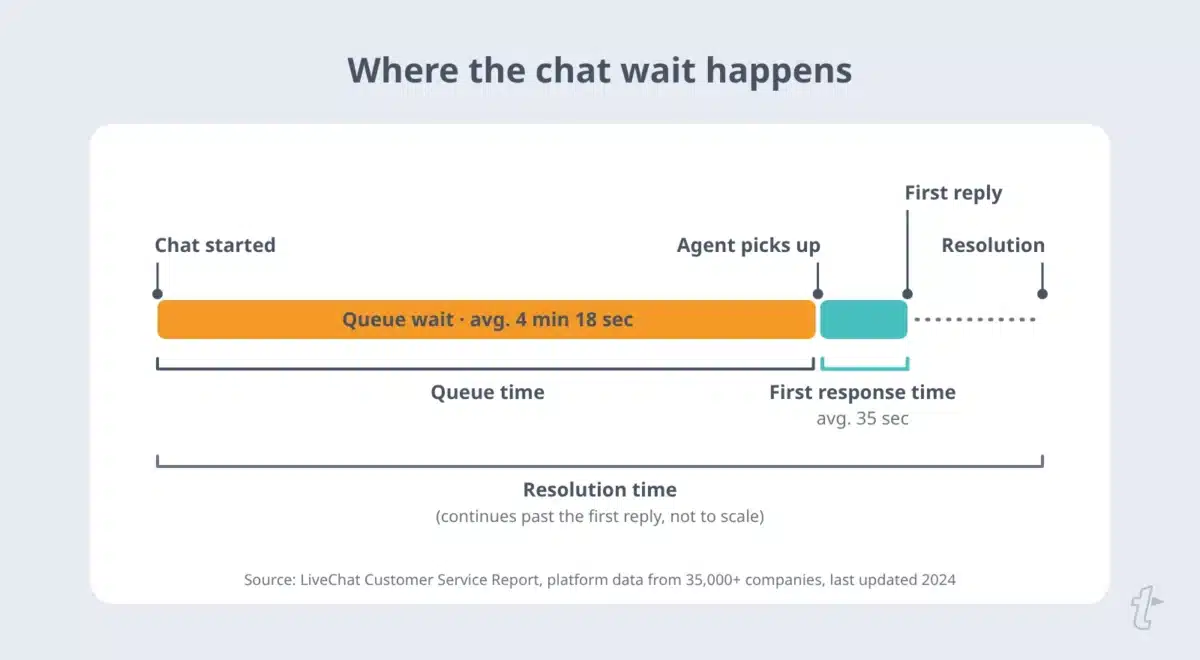
- In live chat, most of the wait time occurs in the queue before an agent replies. In LiveChat’s platform data, the average queue wait is more than four minutes, and the first reply after pickup is about 35 seconds, so staffing, concurrency, and routing matter most.
- Benchmarks help you set a first target, and your own baseline helps you improve it. Expectations range from seconds in chat to hours in email and on social, so set goals for each channel and review them against your own trend.
- Shared saved replies speed up the answer once an agent picks up the conversation. Shared Snippets with Fill-ins let agents insert the stable part of a common answer and personalize the details, and an update to a shared Snippet reaches everyone who uses it.
Before changing staffing or tools, be precise about which clock you’re timing, because “response time” means different things in different help desks.
What is average response time?
Average response time is the average time between a customer’s message and your team’s reply, across all replies in a set time period. It’s a key performance indicator for customer service operations because it measures how long customers wait at every step of their interactions, not just at the start.
Most help desks also report first-response time, sometimes called first-reply time. It measures only the wait between initial contact and the first human reply. Because it occurs before anyone has engaged with the customer, many teams treat it as the key metric for response-time goals.
First response time vs. average response time vs. resolution time
| Metric | What it measures | Clock starts | Clock stops |
|---|---|---|---|
| First response time | The wait for the first human reply | The customer’s first message, or the chat entering the queue | The first reply from a team member |
| Average response time | The average wait between each customer message and the next reply | Each customer message | Each reply |
| Resolution time | The total time to fully resolve the issue | The customer’s first message | The ticket is marked solved |
| Handle time | The time an agent actively spends on the conversation | The agent starts work | The agent finishes, including follow-up work |
Help desks use different names for these metrics, so check yours before comparing numbers. For the next metric, see our guide to average resolution time.
How to calculate average response time
Add up the time customers waited for every reply in a period, then divide by the number of replies.
Average response time = total response time ÷ number of responses
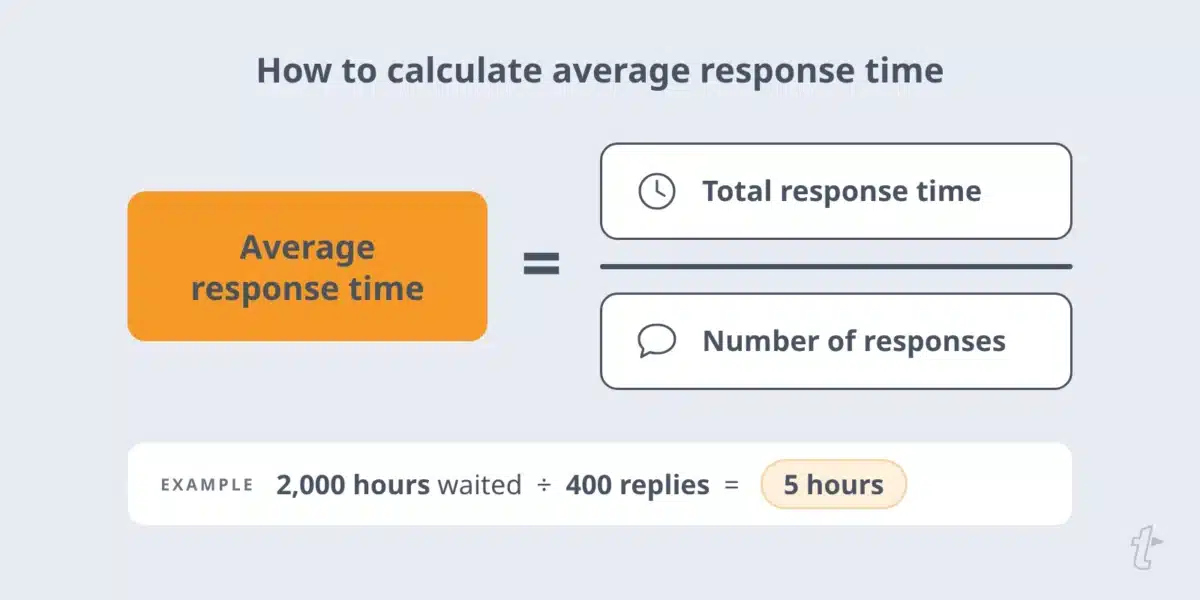
For example, if your team sent 400 replies last week and customers waited a total of 2,000 hours for those replies, the average wait was 5 hours.
Decide whether to count business hours or calendar hours. A message sent at 6 p.m. Friday and answered at 9 a.m. Monday waited 63 calendar hours, but no business hours for a team that works 9 to 5 on weekdays.
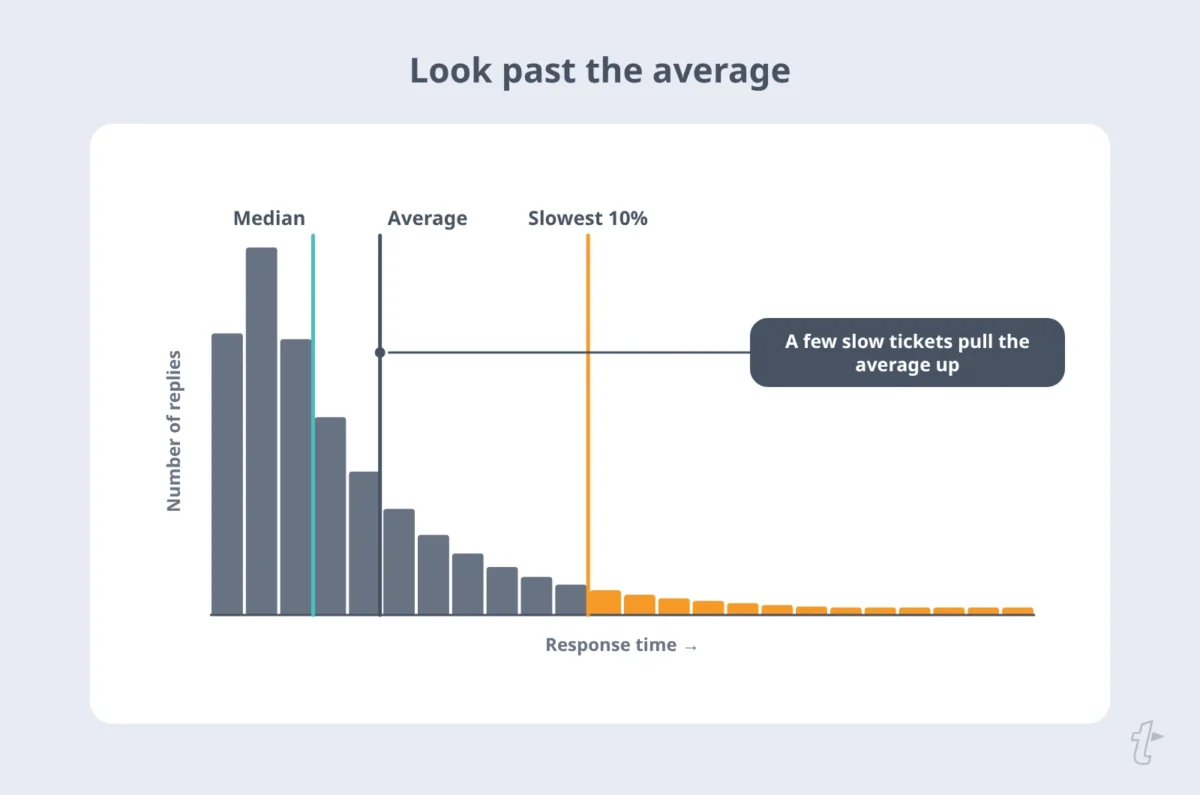
Mixing the two makes comparisons across time periods unreliable, so state your choice in the SLA. If a few very slow tickets pull up the average time, track the median alongside it.
Why average response time matters
Response speed shapes the customer experience before anyone has solved anything, and customers expect more than they used to. In Salesforce’s 2025 State of Service survey of 6,500 service professionals in 40 countries, 82% said customer expectations are higher than they used to be.
Customer satisfaction and loyalty
Quick responses tell customers that their message has landed, which supports customer satisfaction and loyalty. A quick reply doesn’t replace a complete answer, though. In Zendesk’s CX Trends 2026 research, 74% of consumers surveyed across 22 countries said they’re frustrated when they have to repeat information, so a fast reply that makes them start over can cost more goodwill than it earns.
Track response time alongside customer satisfaction scores and net promoter score to see whether speed or service quality is holding you back.
Brand reputation
On public channels, an unanswered question is a visible sign of poor customer service and shapes brand perception. Long chat waits cost conversations outright. According to LiveChat’s platform data, 27.4% of customers left the chat queue before an agent picked up.
Competitive advantage
When products are similar, support becomes part of what customers compare, and fast responses can be a competitive advantage. Measure the link to business outcomes and business performance in your own data.
Compare customer retention, renewals, and customer lifetime value for customers who got quick responses with those who waited longer. If chat handles pre-sales questions, compare conversion rates the same way.
Industry benchmarks for average response time
Industry benchmarks give you a reasonable first target, but industry standards are averages across very different teams. Improve against your own baseline, because expectations vary by industry, channel, and customer behavior.
| Channel | Benchmark | Source |
|---|---|---|
| Replying within one hour meets the expectations of 88% of surveyed consumers | Toister Performance Solutions, 2020 | |
| Live chat | 35-second average first response after pickup; 4 minutes 18 seconds average queue wait | LiveChat platform data |
| Phone | Average wait of two minutes or less | SQM Group, 2023 |
| Social media | About three-quarters of consumers expect a response within 24 hours or sooner | Sprout Social Index, 2025 |
What is a good average response time?
A good response time meets customers’ expectations across each channel. Based on the sources above, reasonable starting targets are under a minute for the first chat reply after pickup, one hour or less for email, two minutes or less on hold for phone, and within 24 hours for social media. Treat these as first targets, then tighten them using your own data.
What is a bad response time?
Response time becomes a problem when it pushes customers to give up or to chase you. Watch for the signals in your own data: rising chat abandonment, customers sending a second message before you’ve replied to the first, and duplicate tickets across channels.
Those patterns show longer response times than your customers will tolerate, whatever the benchmark says.
Email response time benchmarks
In Toister Performance Solutions’ 2020 study (sponsored by SuperOffice), nearly a third of customers expected an email reply within one hour, and replying within an hour met the expectations of 88% of respondents. Few expected a reply within 15 minutes, and that group is shrinking.
For faster email responses, see how to improve email reply times.
Live chat response time benchmarks
In LiveChat’s data from businesses using its platform (35,000+ companies, last updated 2024), the average first response time after an agent picked up was 35 seconds, but the average queue wait before pickup was 4 minutes 18 seconds.
First replies ranged from 35 seconds in software and financial services to 55 seconds in retail. That gap between queue time and first reply is the most useful number in the report, and the live chat section below covers what to do about it. For wording to use while customers wait, see our live chat scripts.
Phone support response time benchmarks
SQM Group, a call center research firm, argues that an average wait of two minutes or less is acceptable for phone calls and that customer satisfaction declines as wait times increase. It also reports that answering faster than two minutes doesn’t raise satisfaction further, which matters for resource allocation.
Social media response time benchmarks
According to the 2025 Sprout Social Index, about three-quarters of consumers expect a brand to respond on social media within 24 hours or sooner. Track social platforms separately, since replies there are public.
Factors that influence response times
Several factors affect how quickly your team can respond to customer messages: staffing, tools, and the kinds of questions you receive.
Team availability and staffing
Launches, outages, and seasonal peaks stretch the same customer support team across more customer inquiries, so response times rise even when no one works slower. Matching staff to demand is as much an operational efficiency question as a customer experience one.
Technology and automation tools
Automated systems such as chatbots can give instant responses to simple questions. They work best with a clear path to a person. In a 2026 Gartner survey of 3,566 customers, 87% said access to a human agent is essential when companies use generative AI in customer service.
Industry and customer expectations
Expectations differ by industry and situation. An e-commerce customer with a billing error wants fast responses, while a professional services client may accept a few hours, or even four hours, for a detailed answer. Set targets that reflect customer needs on each channel, not one number for everyone.
Complexity of inquiries
Simple questions can get a complete answer in one reply. Complex inquiries and issues may require research or a handoff, so acknowledge them promptly and say when to expect a full answer.
Concurrent chats per agent
In live chat, agents often handle several conversations at once. Each added chat means slower responses in the others, so concurrency limits trade per-chat speed against queue length. The live chat section below shows how to find your team’s limit.
How to improve first response time
These strategies to improve first response time apply to every channel. Live chat has its own queue problem, covered in the next section. If you only fix one thing, start with the step that matches your biggest delay.
Acknowledge every message right away
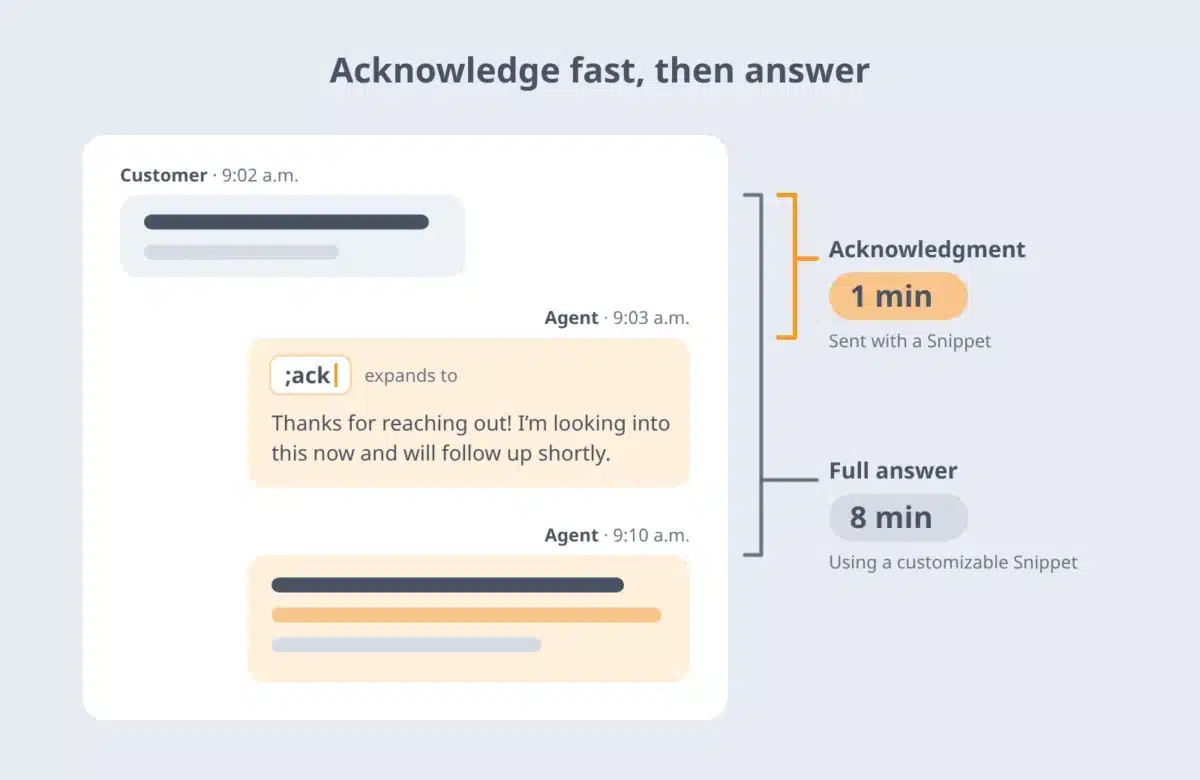
Send an immediate acknowledgment confirming the message arrived and providing a realistic expected wait. An immediate response like this can head off follow-up messages from customers who aren’t sure you received theirs.
Check how your help desk treats these automated responses: if it counts them as a first response, your first response time will look better than the customer’s experience. Measure the first human reply separately. A personal acknowledgment sent with a Snippet, like the one below, is a fast first touch, but it isn’t the answer, so track when the full answer goes out too.
Route and prioritize by urgency and channel
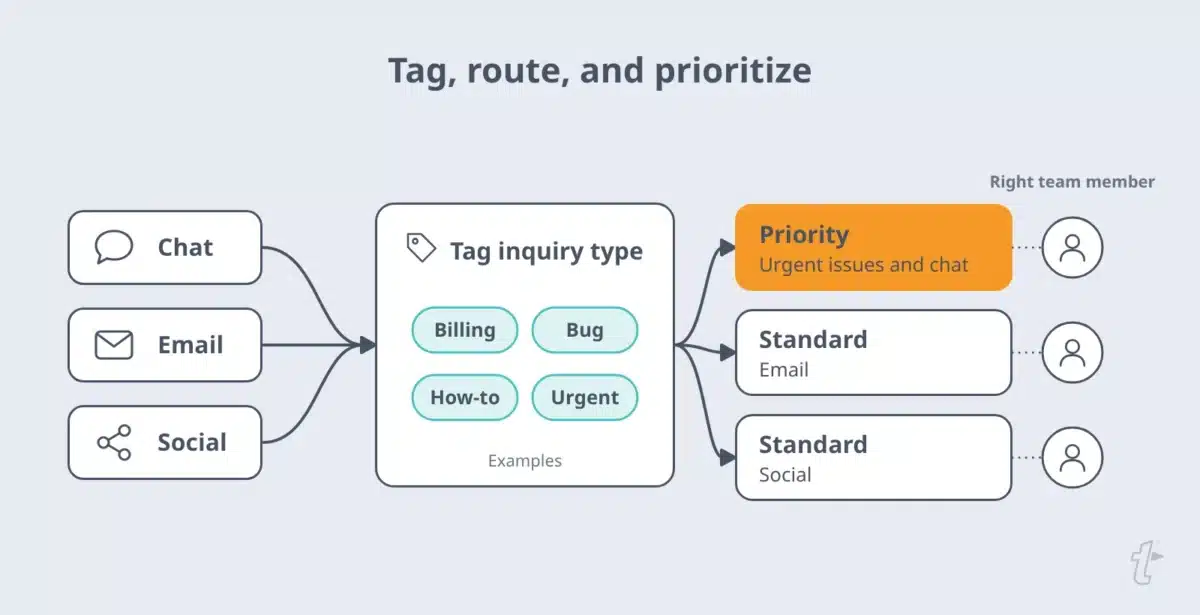
Tag inquiry types and automatically route customer inquiries to the right team member. Urgent issues and channels with tighter expectations, like chat, should move to the front of the line. Agents who start with the right context respond faster, ask fewer clarifying questions, and resolve issues quickly.
Optimize team training and staffing
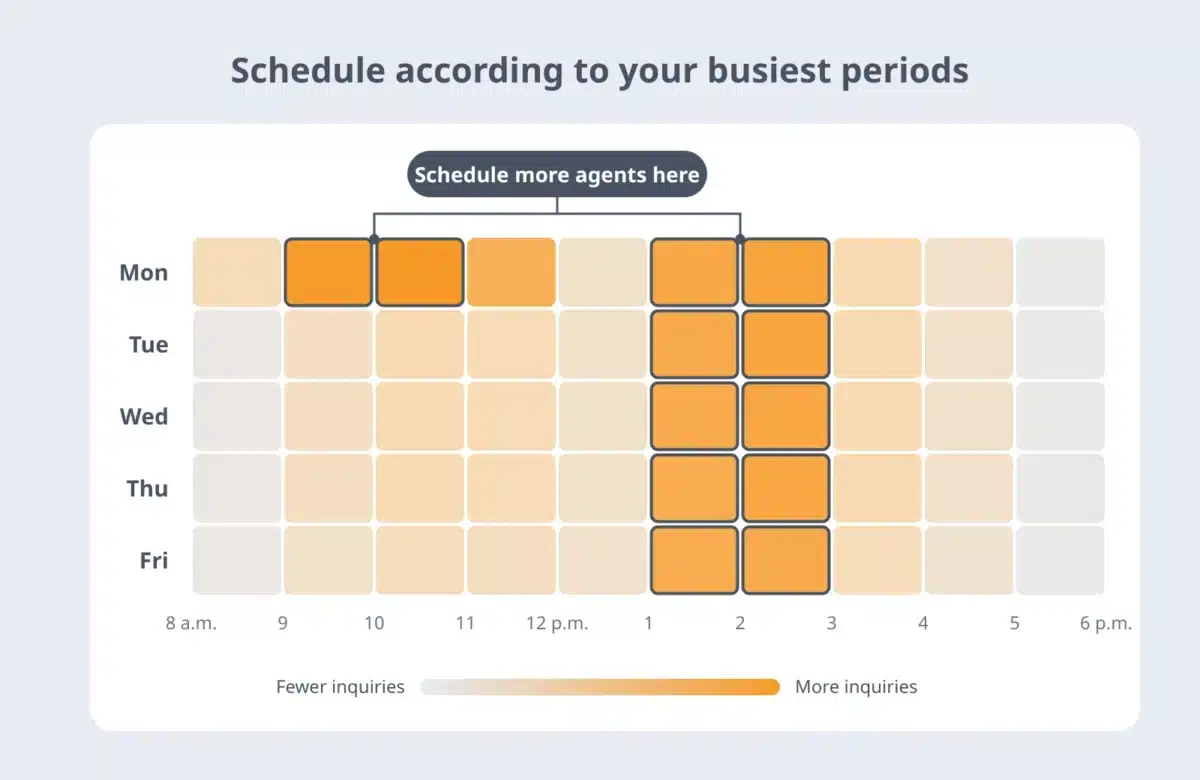
Use historical hourly and daily volume data to schedule agents for peak periods. Cross-train agents to answer customer inquiries outside their usual queue, and give new agents approved answers from day one so speed doesn’t depend on tenure.
A shared Snippet library makes cross-training easier to implement. When billing, technical, and account specialists each save their best answers to a shared Snippet group, any agent can find the approved reply for a question outside their usual area and send it in seconds, without waiting on a specialist or writing an answer from scratch.
Fill-ins prompt for the details that change, like an account name or plan type, so the reply still fits the customer. When a specialist updates an answer, the change reaches everyone who uses that Snippet, so agents in other queues aren’t working from outdated wording.
Set clear service level agreements (SLAs)
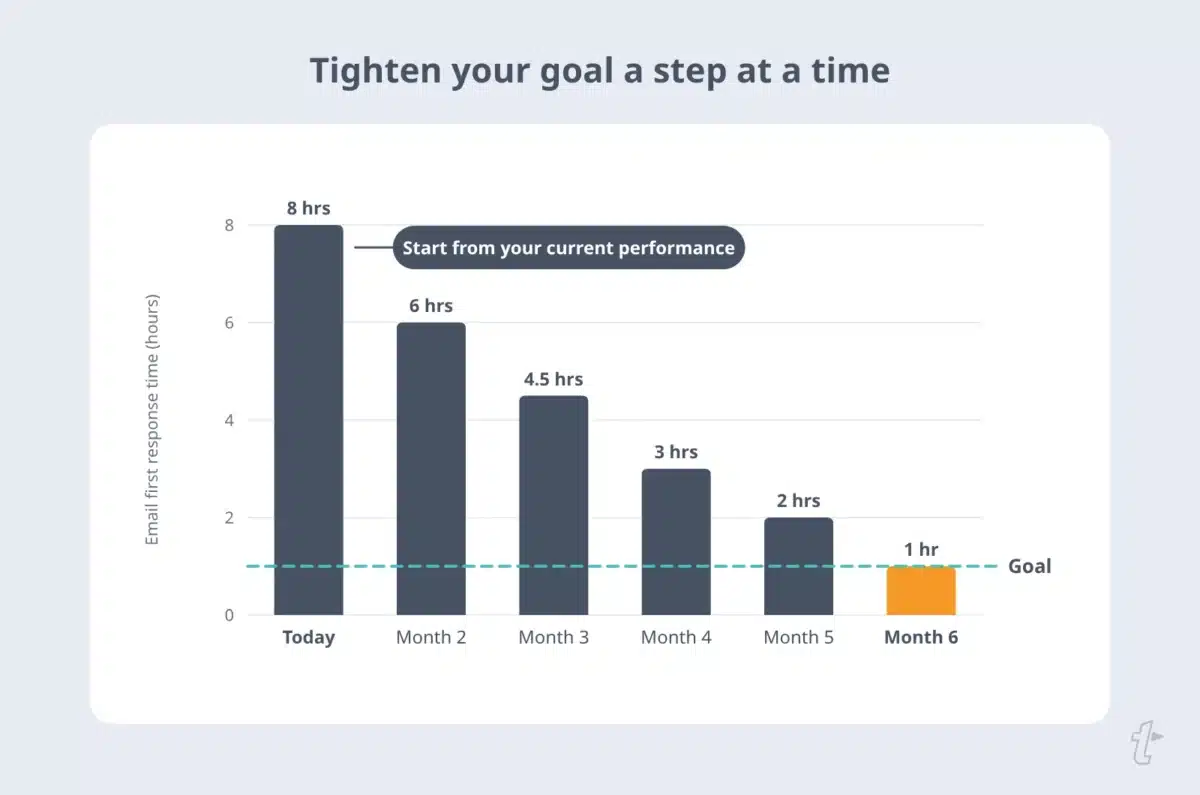
Set one target per channel, such as a first-response goal for email, and separate queue and first-reply goals in a live chat SLA. Set response time and internal goals based on your current performance, not the industry average.
If your email first-response time is 8 hours today, a 1-hour goal next month isn’t realistic, but a shorter response time each month is. Set realistic goals you can hit, tighten them as the response process improves, and share external targets so customers know when to expect a reply.
Monitor and analyze response times
Review response times and chat queue abandonment weekly by channel, hour, and inquiry type to identify patterns, team performance gaps, and improvement opportunities. Look at the median and the slowest 10% of replies as well as the average, since a few slow tickets can hide behind a decent average. Connect the trend to first contact resolution so you’re balancing speed with complete answers.
How to reduce live chat wait times
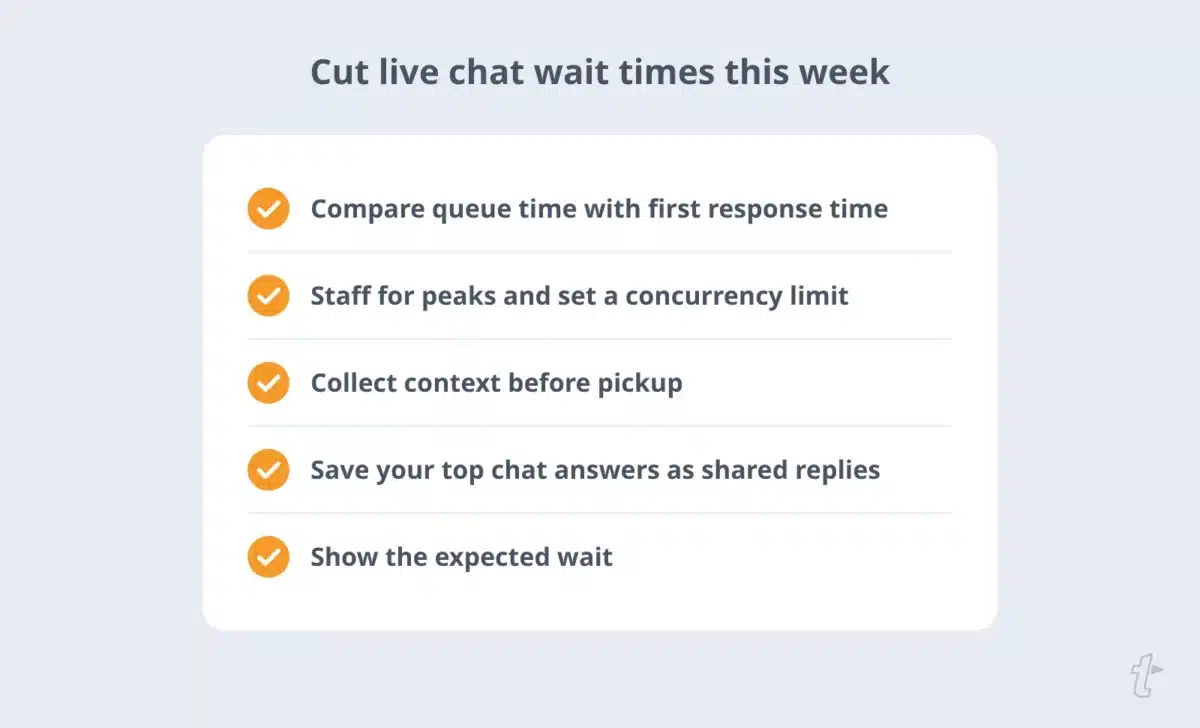
Open your chat report and compare two numbers: average queue time and average first response time. If queue time is larger, customers are waiting for an agent to become available, and the fix is capacity and routing.
If the first response time is longer, agents pick up chats quickly but take too long to start answering; the fix is faster access to answers. Some help desks report these two numbers separately, and some combine them, so check how yours measures each one before you set targets.
In LiveChat’s platform data, most of the average chat’s wait happened before any agent had opened it.
The two numbers are connected. When agents don’t have answers to common questions at their fingertips, they search the knowledge base, dig through old tickets, or ask a teammate before they can reply.
Every minute spent looking for an answer is a minute that the agent can’t pick up the next chat, so slow answers can make the queue longer. TextExpander gives your team a shared library of approved answers that agents insert with a short abbreviation in the chat tool they already use. Each reply goes out within seconds, and agents reach the next customer sooner.

Staff for peaks and set a concurrency limit
Set an alert when the chat queue passes a set length so a lead can pull in help, and plan chat coverage separately from email, since their peaks don’t always match.
There’s no universal number for how many chats one agent can handle. Compare per-chat reply times when agents handle one, two, three, and four chats at once. Where reply times jump is your practical limit, so set concurrency just below it and raise it only when agents get faster ways to answer.
Collect context before pickup
Pre-chat contact forms or a chatbot can collect the order number and issue type before the chat reaches an agent, then route it to the right team. The agent who picks up the chat can start with an answer instead of a question.
Answer common questions with saved replies
Save your 10 to 20 most common chat answers as shared replies, with fields for details that change, such as names and order numbers.
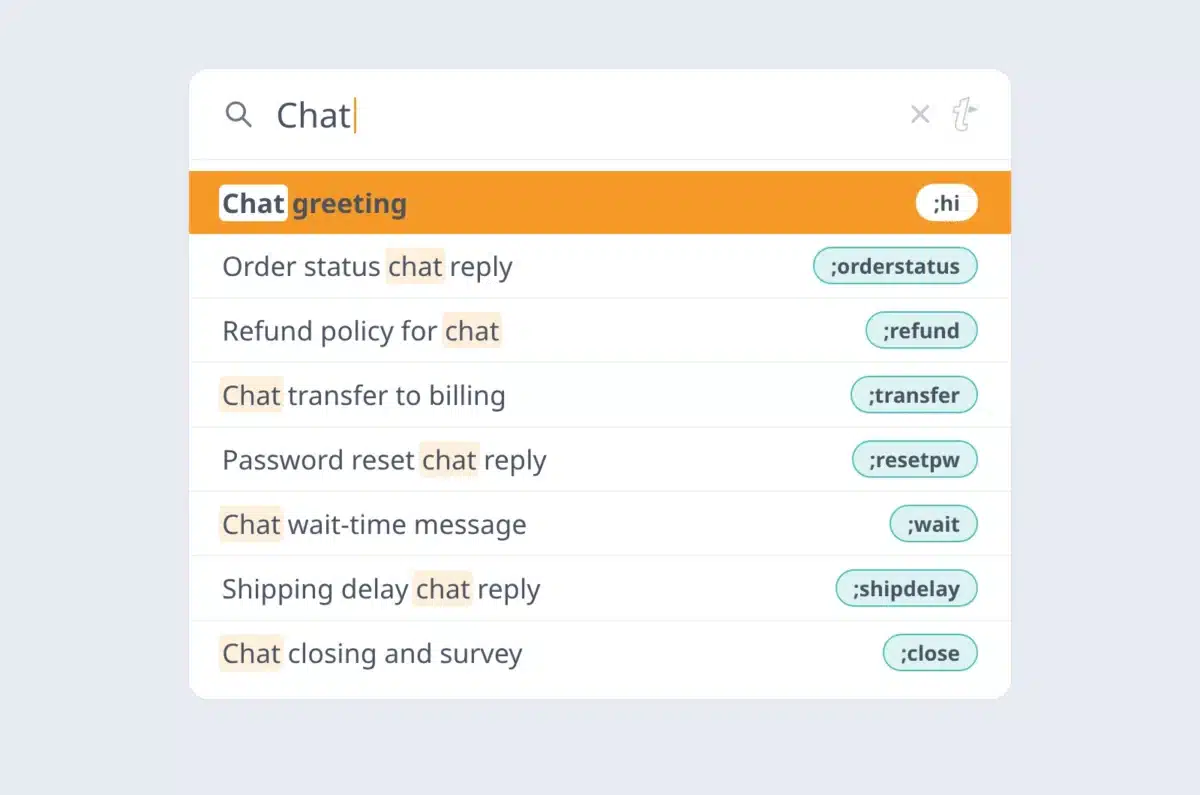
Agents can then respond to customer questions in seconds with a complete, consistent answer and personalize the rest.
Virta Health, whose member communication occurs mostly via chat, uses a shared TextExpander library so its coaches can quickly find and use approved information.
As Kristin Hullett, Care Operations Senior Associate, put it: “We need ways to be both efficient and accurate with [chat], otherwise it would take so much more time.” For examples to start from, see these live chat canned responses.
Saved replies cover the most common questions. For everything else, a searchable knowledge base keeps agents in the chat instead of hunting through documents.
In an IDC survey of 417 U.S. contact centers, commissioned by Talkdesk, half agreed that their agents spend too much time looking for answers. Keep the knowledge base short, up to date, and linked to the saved replies agents use most.
Tell customers how long they’ll wait
Show queue position or expected wait time, and offer to continue by email when the wait is long.
A clear status message helps set expectations and gives customers a reason to stay. Our hold and wait time scripts give you wording to start with.
How TextExpander can help average response time
Once an agent picks up a conversation, the next delay is writing the answer. TextExpander keeps your customer service team’s common answers a few keystrokes away in the tools they already use, including the help desk, chat, email, and Slack.
Create reusable Snippets for common responses
Save your team’s most common answers, greetings, and closings as Snippets in a shared Snippet group. Agents type a short abbreviation, and the full answer appears in the chat or email they’re working in. When someone updates a shared Snippet, everyone on the team uses the updated version.
Ensure consistent messaging
Shared Snippets give every agent the same approved wording for policies, troubleshooting steps, and sign-offs, so customer interactions stay consistent, no matter who picks up the chat. Saved replies also help with details that are easy to mistype, like links and product names.
Personalize responses efficiently
Fill-ins prompt agents for the details that change, like a customer’s name or order number, before the Snippet expands.
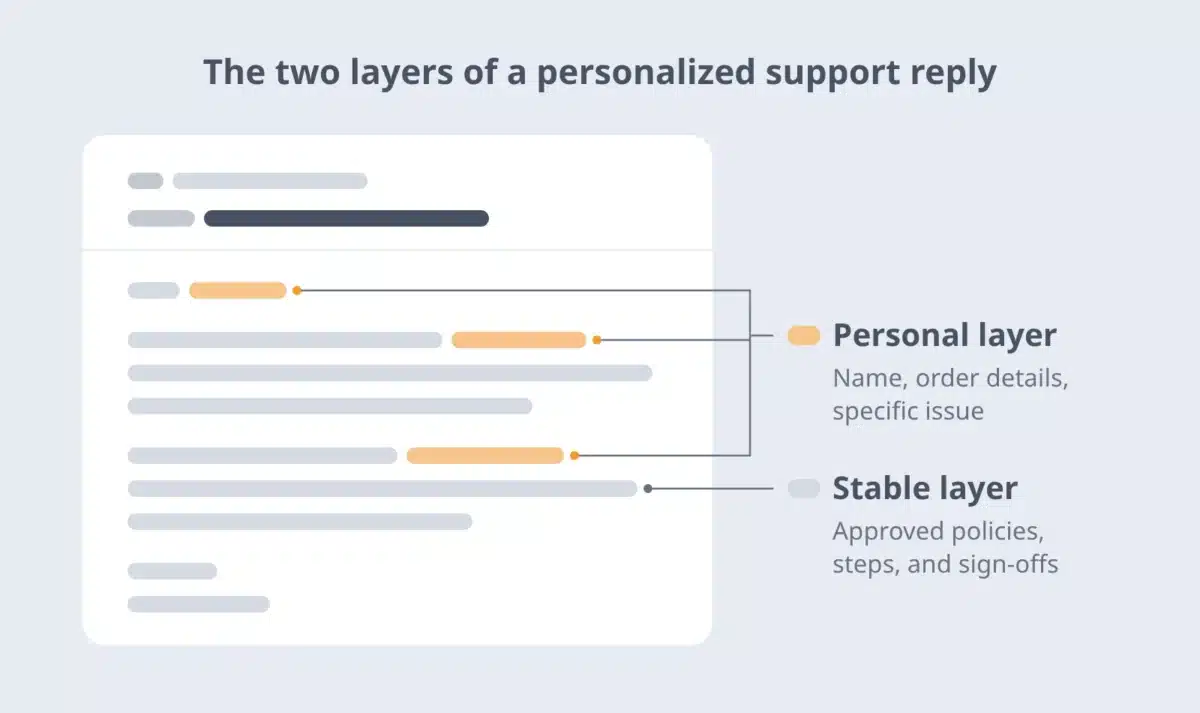
The stable part stays consistent, and the personal part stays personal. If your team already uses help desk macros, those work well when every reply happens inside one tool. Snippets work alongside existing systems when the same answers are needed across chat, email, Slack, and other communication channels.
TextExpander allows me to respond quickly while maintaining accuracy, professionalism, and consistency across all communications. By using pre‑built snippets, I reduce errors, save time on routine responses, and handle a higher volume of work more efficiently.
Norma Yanac, Customer Support Agent, Arb Interactive
To see how support teams set this up, visit TextExpander for customer support.
Tools for measuring average response time
Most customer service software reports response time metrics without extra setup. Check each tool’s current documentation for how it defines them before you compare numbers across tools.
- Zendesk: Reports first reply time and other ticket metrics; dashboards let you filter by channel and time period.
- Freshdesk: Reports average first response time in its Helpdesk In-depth report, which you can break down by source, priority, and ticket type.
- HubSpot Service Hub: Reports response times alongside customer history in the HubSpot CRM, which helps teams that want customer data and support metrics in one place.
- Intercom: Reports conversation response times for live chat and messaging, including time to first reply.
- LiveChat: Reports first response time for chats and tickets, plus how many customers waited in the queue and how long they waited before connecting to an agent.
- Help Scout: Reports first response time and other email support metrics in a simple dashboard.
- Sprout Social: Tracks response times across social platforms, so you can measure social separately from email and chat.
5 common mistakes and how to avoid them
1. Delays due to unclear processes
Without clear ownership, customer inquiries sit unassigned. Document who handles each inquiry type and when to escalate.
2. Over-reliance on automation without human oversight
Bots and automated responses help with volume, but they frustrate customers when they block access to a person. Make it easy to reach a human, and review automated conversations regularly.
3. Ignoring data and analytics
A monthly average hides the hours and inquiry types where waits pile up. Review response times by channel and hour, and check overall performance against your SLA across the customer journey.
4. Inadequate staffing during peak hours
Staffing to the daily average leaves peaks uncovered. Schedule your customer service team based on hourly and daily volume.
5. Letting chats sit in the queue with no status message
Customers who don’t know how long they’ll wait may leave or contact you again on another channel. Acknowledge every message, show the expected wait in chat, and update customers if it changes. Consistently fast acknowledgment helps even when the full answer takes longer.
Where to start
Pull last month’s queue time and first response time by hour for each channel. Fix the larger number first: add capacity where queues build, and give agents faster access to answers where first replies lag.
Then set response-time goals based on that baseline and review them weekly alongside customer satisfaction.
If saved replies are part of the fix, try TextExpander free and save your team’s most common chat answers as shared Snippets.
Frequently asked questions
What should a live chat SLA include?
A live chat SLA should set separate targets for queue time and first response time, specify the hours the SLA covers, and define what happens when the queue exceeds a set length, such as displaying a status message or sending an email follow-up.
It should also state whether times are measured in business hours or calendar hours and how often the team reviews performance against it. Keep targets realistic for current staffing, then tighten them as routing and saved replies improve.
Do response times include after-hours messages?
Response times include after-hours messages only if your help desk measures calendar hours. With business hours, a message sent overnight starts the clock when the team comes online. With calendar hours, the overnight wait counts.
Either approach works, but choose one, state it in your SLA, and compare like with like. If you offer 24/7 support on some channels, measure those channels in calendar hours.
What is the difference between response time and handle time?
Response time measures how long customers wait for a reply. Handle time measures how long an agent spends working on a conversation, including talking, typing, and follow-up work.
A team can have a fast response time and a long handle time, or the reverse, so track both. Response time shows the customer's wait, and handle time shows the agent's workload.
How do you track response times on social media?
Track social media response times with the reports in your social inbox or social media management tool, and keep social separate from email and chat because customer expectations differ by channel.
Include both public replies and direct messages, and decide whether an automated acknowledgment counts as a response. Review results by platform, as volume and expectations vary across platforms.
Will saved replies make support conversations sound robotic?
Saved replies don't have to sound robotic. Save the stable part of an answer, like a policy explanation or troubleshooting steps, and personalize the rest: the customer's name, their specific issue, and a line that shows you read their message.
TextExpander shared Snippets support this with Fill-ins, which prompt agents for the details that change before the reply is inserted. Review saved replies regularly so the wording stays up to date.
See how support teams use TextExpander for customer support.


