Stop typing the same thing over and over
TextExpander’s keyboard shortcuts work everywhere your team does. Build a library of your most-typed content with a free team trial.
 Sign up with Google
By signing up you agree to our Privacy Policy and Terms of Service
TextExpander helps teams build consistency with every message
TextExpander + AI
The Next Generation of TextExpander.
TextExpander + AI enhances productivity, while keeping you in control.
Faster and more accurate typing than ever before
Tired of repetitive typing? Store and share a library of your collective
knowledge and activate it anywhere you type with only a few keystrokes.
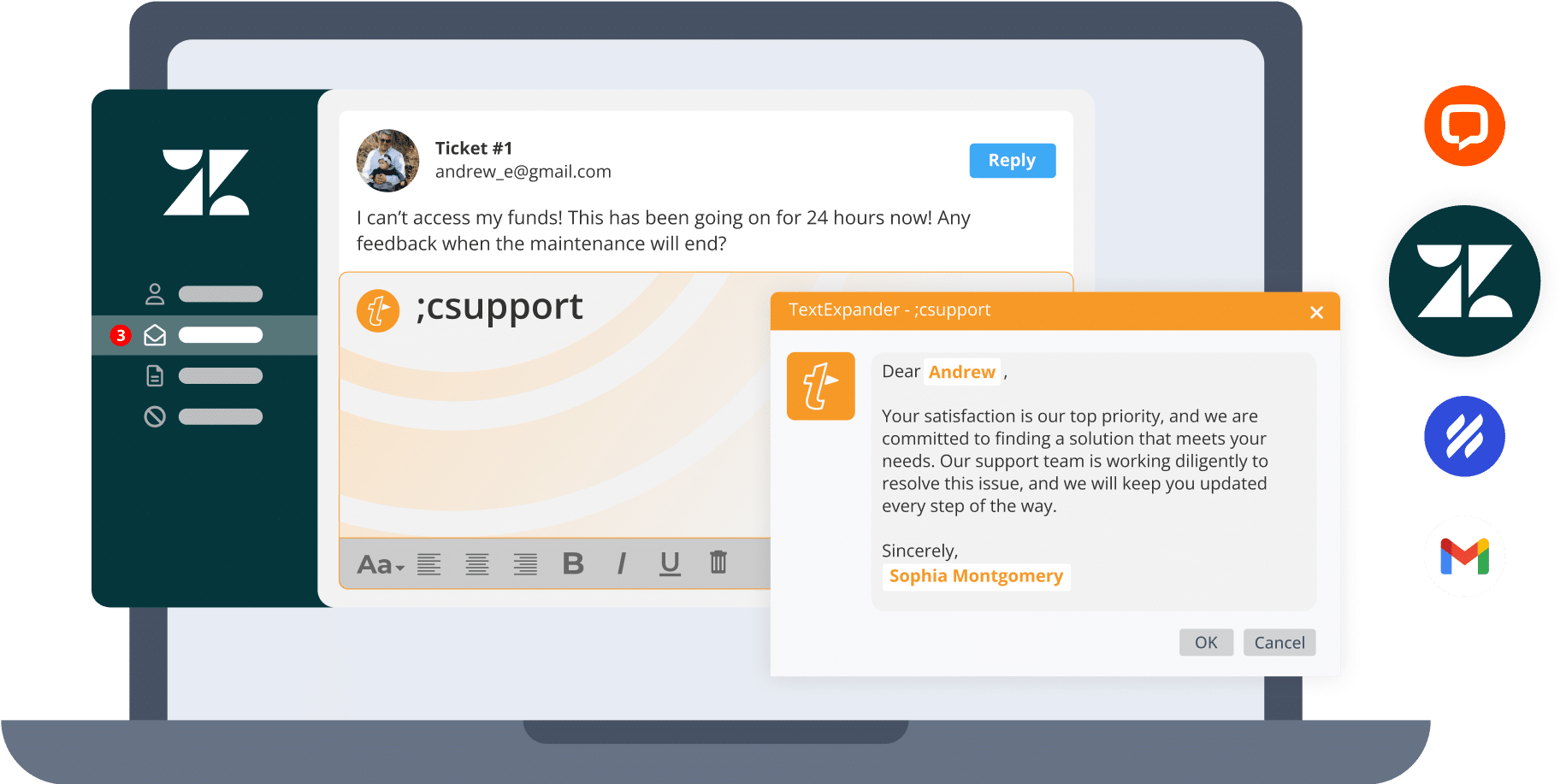
Here’s how it works:
Create Snippets of your most used text, such as emails, phrases, URLs, and more.
Customize them to automatically insert content or add fill-in-the-blank fields.
Expand them with just a few keystrokes on any device, across any app you use.
Share them with your team so everyone stays consistent with up-to-date content.
FOR ENTERPRISE
Ready to centralize and standardize your team’s messaging?
TextExpander is built for enterprise teams with SOC 2, SOC 3, and HIPAA compliance. We can build pricing based on your needs and usage, including single sign-on, SCIM, and customized reporting capabilities.

Our customers love us
AND YOU WILL TOO

Case Study
See how each member of Virta Health’s Care Team saved 24 days per year with TextExpander
Read the case studyNow we have a system for creating and updating the messaging our coaches use as a framework to communicate with our members, with personalization top of mind.
Kristin Hullett, Care Operations Senior Associate at Virta Health
It genuinely streamlines my work day so much. I love that my own Snippets are separate from my orgs and how when I go to edit a snippet I just used, it is glowing and easy to locate visually. Also, love that you can include emojis.
Kenzie P.

With the volume of emails and live chats that I manage daily, I literally could not get through my workday without Text Expander. It’s a LIFESAVER.
Marysa K.
Support

TextExpander has made working a breeze. They really changed the way we think about internal notes.
Brianna W.
Support

TextExpander has improved my productivity ten-fold, it is easy to use, and full of capability. I use it in almost all tasks now! It saves so much time instead of having to type the same things out over and over!
Justin F.
Fraud Investigator

I send many emails with the same wording to recruiting candidates over and over again. TextExpander helps so that all of my wording is uniform for each candidate to streamline information. It also reduces the time it takes me to send out emails to every person significantly.
Haley M.
Recruiting Business Partner

Text expander makes my job so much easier! I don’t have to type out as much and it’s so easy to create customized snippets that are tailored to your preference. In the medical field it’s especially helpful so we can spend more time with patients and less time charting.
Angelina E.
Customer Onboarding Manager

I am able to keep and store items that I tell customers over and over again but without typing it out each time! I love that I can edit them to add more information and improve my customer communication.
Sandra M.
Implementation Specialist

What I love about TextExpander is that it saves me so much time with repetitive details of my job. It’s wonderful how a snippet will save me time and the trouble of writing everything out completely. I also love that I am able to share my snippets in my work environment and vice versa.
Like using dot phrases but just typing shortcuts.
No more monotonous writing in chats and emails. Very user friendly as you can figure out things by yourself. I do not need to spend time writing the same thing again and again as I have to answer to similar questions everyday. I can use it even in intercom and other websites for usual templates.
As a health care provider, documentation is my least favorite thing. In my current EMR there are no macros. I saved an average of 6 to 10 hours/week using TextExpander. Set up was easy. And it is incredibly affordable. I use it daily.
Extremely easy to set up & train team on, and then once the team was trained we are able to use it every day! We can use it in Salesforce, Microsoft Office, or literally any other text box. It allows us to standardize language and save time. Customer Support has been great as well in helping us troubleshoot problems.
I like that textexpander is easy to use and the interface is very user-friendly. It was easy to implement in my daily tasks and helped me to be more efficient. I use the app every single day because it helps me to get through my days with ease.
Jessica J.
Provider Retention

This tool solves the rate at which I find specific information and helps me retain product knowledge and more confidently do my job. I talk on the phone and write emails daily, so text expanders help convey product knowledge daily.
Nadia P.
Sales

Formatting is so seamless, always populates correctly. I love the keyboard shortcut to find a snippet, helps me work quickly. I don’t work without TE, and I use it for everything from templates for emails and notes to customer replies and code.
Jen W.
Support

Moreso than the time savings, TextExpander saves me from grief and robotic repetitiveness. My workflow has significantly improved by being able to quickly insert often-used phrases, questions, or sign-offs.
Mark M.
Product Support

TextExpander is a tool that I cannot live without. I regularly use it to perform repetitive tasks that previously required copying, pasting, and editing. The ability to fill in single-line fields has transformed error-prone tasks into simple and reliable text snippets that I use daily in emails, static website updates, and terminal commands.
The app you didn’t know you needed until you can’t live without it! I’ve used it for years now and always adding new templates which save me so much time. Whenever I show it to someone else they all gasp and ask how they can get it. It’s like magic!





Give it a test drive
Use the interactive snippet widget below to understand how TextExpander works.
See which plan is right for you
Individual
Communicate faster and smarter so you can focus on what’s important.
Price in USD per user per month.
Billed annually at $39.96 USD
Business
Collaborate and communicate effectively with your team.
Price in USD per user per month.
Billed annually at $99.96 USD
Growth
Advanced user management and data insights.
Price in USD per user per month.
Billed annually at $129.96 USD
Enterprise
Pricing based on your needs and usage.
Custom solutions and personal support.
The prices shown above are in USD and are based on US tax regulations, which means they exclude tax. For some customers outside the US, this US base price may still apply if your country does not require tax-inclusive pricing.
If you’re located in a country where VAT or GST is required (including the European Union, United Kingdom, Australia, and others), your base price may include an estimated 20% increase to reflect local tax requirements.
When you check out, your final price will be converted to your local currency using exchange rates provided by our payment partner, Paddle. These rates may not always match real-time market rates exactly, but they’ll be close.
Your total price — including any required taxes — will always be shown clearly before you complete your purchase.
Your shortcut to productivity
Create shortcuts for your most-used content – anywhere you type.
Begin your 30-day free trial. No credit card required.
By signing up you agree to our Privacy Policy and Terms of Service